Projected Head
A 3D-printed head that looks around, blinks, smiles, talks and changes its face without a single moving part in the face itself. Pan, tilt and roll are mechanical. Everything expressive is light, rendered in Blender and projected back onto the surface it was modelled from.
- Form
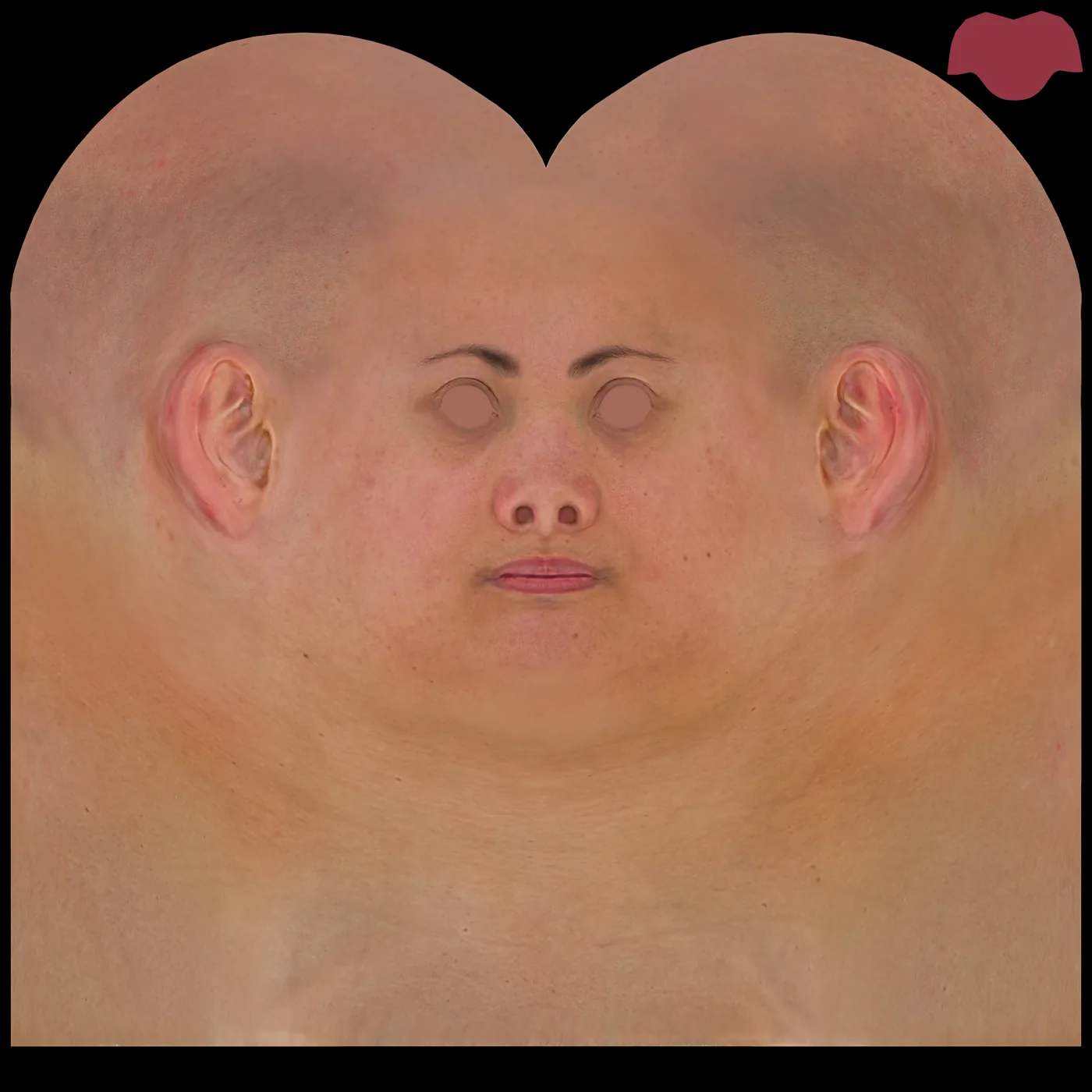
- 3D-printed scan of an HD human head (3D Scan Store), 8K UV texture
- Light
- HY300-class compact LCD projectors, 1280 × 720 native, laid out for at least two
- Motion
- Pan, tilt, roll on MG996R hobby servos, ESP32 and PCA9685 servo board, animated in Bottango
- Software
- Three Blender add-ons written for this project: Eye Rig, Face Expressions, Face Overlays
Every test, on one wall
Photos and films from the whole build, from the first colour patches to the clown. Drag to explore and open any of them to see it full size.
Expression as light
Animatronic faces are expensive because every expression needs an actuator, a linkage and a skin that survives being stretched thousands of times a day. Projected faces avoid that cost by moving the expression into light, but they bring a new problem: the image only works while it stays registered to a surface that may itself be moving.
This project builds a complete, working pipeline for a projection-mapped head. A scanned head is printed and mounted on a three-axis servo neck, animated in Bottango. Its digital twin in Blender carries a rigged pair of eyes, a facial expression system that can either warp the face texture or deform the head with scanned expressions and a library of interchangeable faces. A virtual camera matched to the physical projector renders the twin, and the projector paints that render back onto the print.
The page documents the system, the mathematics behind each stage and the human-factors research that shaped the animation. It ends with the next mechanical revision: replacing hobby servos with closed-loop steppers, because the backlash in the current neck is now the largest source of error between the projected image and the head it is meant to fit.
The physical head moves slowly and coarsely. The projected face moves quickly and finely. The illusion lives in how well the two agree.
Why project a face?
Projected faces are not new, but projected faces on heads that move freely have only reached parks and trade floors in the last two years. Before building anything, I looked at how the industry and the research community have approached this, from the earliest projected faces to the dynamic systems shown in 2025 and 2026, so this project could be positioned against the state of the art rather than reinvent it.
Fifty years of projected faces
Disney's Haunted Mansion (1969) projected filmed performances onto Madame Leota's head in a crystal ball and onto a row of singing busts. The principle has not changed since: a sculpted form supplies real depth and silhouette, and projection supplies a performance that would be impossible to engineer mechanically. The limitation was also fixed from the start. The heads could not move, because the film was locked to a static surface.
The Seven Dwarfs Mine Train (2014) brought projection onto figures that do move, blending mechanical animatronics with computer animation projected onto the Dwarfs' faces [2]. The same facial approach was carried into Frozen Ever After in 2016 [3]. In both, the head's movement is choreographed in advance, so the projected content can be authored to match a known motion.
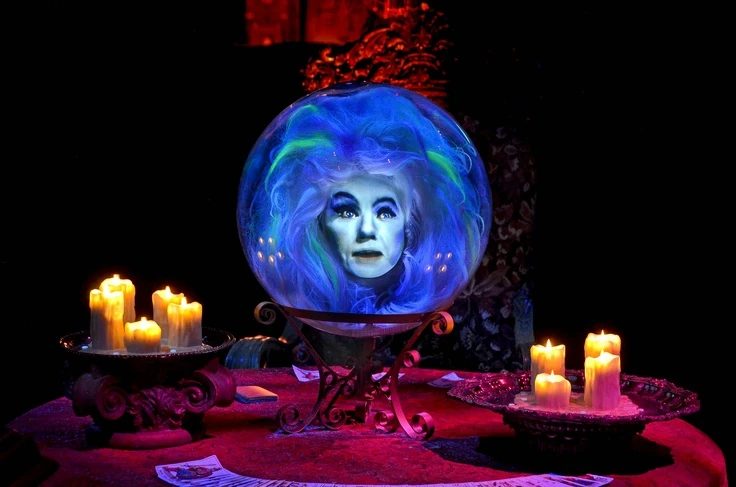
assets/research-haunted-mansion.jpg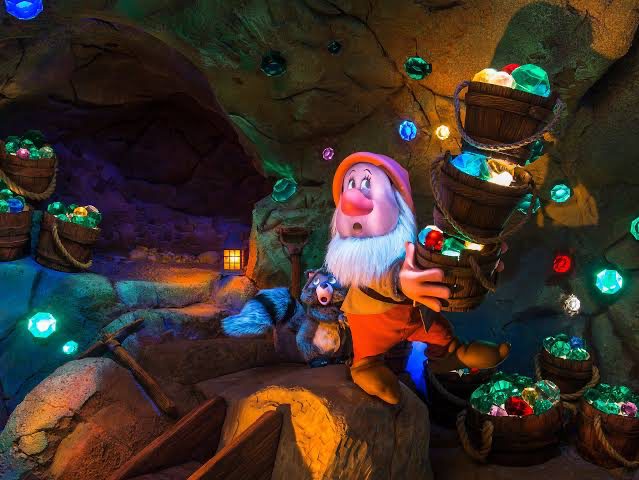
assets/research-seven-dwarfs.jpg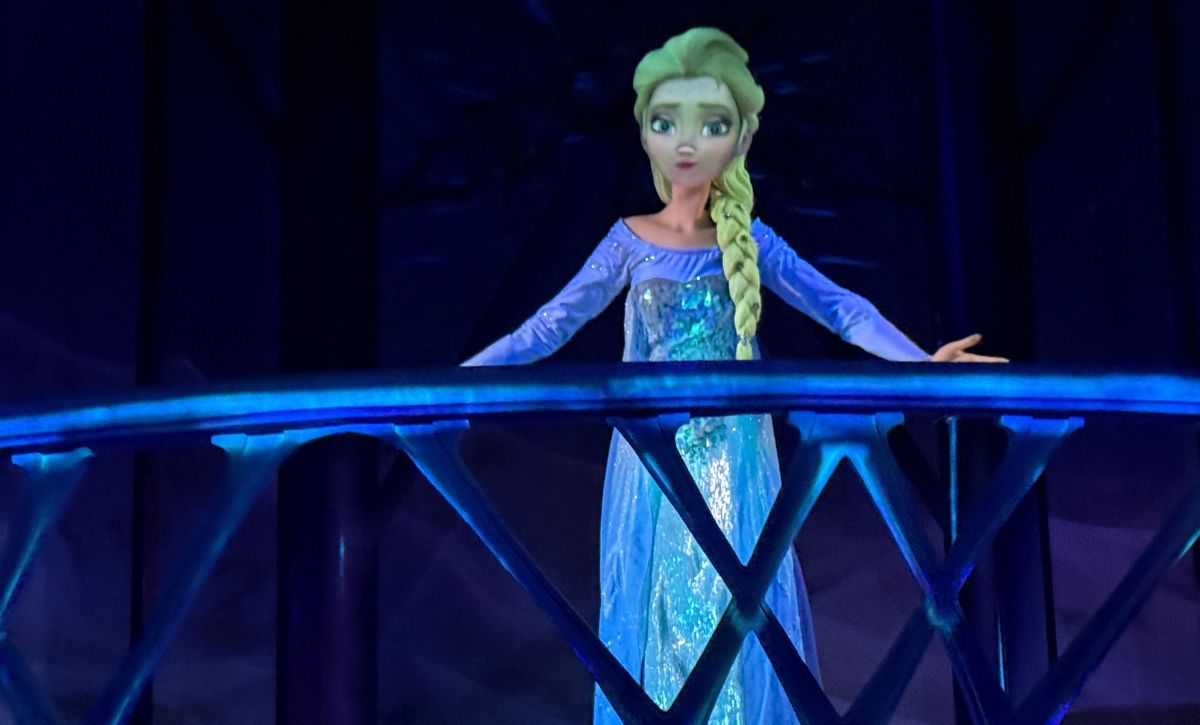
assets/research-frozen.jpgThird-party images: use your own photographs, or press images used with permission and credited in the caption.
The research foundation
Disney Research turned these techniques into a method. Bermano et al. (SIGGRAPH Asia 2013) split a facial performance into low-frequency motion that an animatronic head can physically reproduce and high-frequency detail added with projected shading [1]. That decomposition is the theoretical basis for this project: the neck carries the slow motion, and light carries everything faster.
Four years later, Makeup Lamps (Eurographics 2017) projected onto live human faces with no markers at all [8]. A high-speed camera under infrared illumination, running at 1,300 Hz, tracks head pose and expression; a customised Christie DLP projector runs at 480 Hz; adaptive Kalman filtering predicts where the face will be when the light arrives. The measured end-to-end latency was 9.8 ms. The lesson for any moving target is that latency, not resolution, decides whether projection stays on the face.
State of the art: two systems shown in 2025 and 2026
Walt Disney Imagineering · Pirates of the Caribbean, Disneyland
In June 2026, Disney debuted its first projection-mapped face on an Audio-Animatronic: the skeleton pirate on the treasure in scene 11, which now transforms between pirate and skeleton in a looping story about a cursed coin [9, 11]. The face is a 3D-printed shell with almost no mechanical articulation. Imagineers prototyped and kept only what they needed: the jaw stayed and the nose was cut [10].
- Pose source. The figure's animation data is fed in real time into Unreal Engine, which renders the face [9, 10].
- Tracking and calibration. Cameras keep the face aligned as the figure moves. Calibration markers hidden in the bandanna glow under UV light at night, when the system calibrates, and are invisible to daytime guests. A blue and white grid projected over the figure maps the projector to every contour [9, 10, 11].
- Robustness. Two projectors, one running and one on standby. Disney states the face stays aligned even if a motor fails and the figure moves incorrectly [9, 11].
- Intellectual property. A Disney patent application (US 18/592,863, filed March 2024, published September 2025) describes sensing the figure's orientation, rendering the next frames from live sensor input, and sending motion commands to keep body and image in sync [12].
P&P Projects · ThemedMotion × 7thSense
P&P Projects, the Dutch theming company, launched ThemedMotion as its animatronics division at IAAPA Expo Europe 2024 [16]. With 7thSense, its sister company CurtainUp and Scalable Displays, it now offers dynamic projection mapping onto moving animatronic figures as a turnkey product [13, 17]. I saw the demonstration, a projected face on a freely moving animatronic head, at IAAPA Expo Europe 2026 in London.
- Pose source. Measured, not commanded. 7thSense's reactive projection mapping uses high-speed tracking cameras and motion-capture tracking markers to update a digital twin of the object up to 240 times a second [14, 15].
- Rendering. 7thSense's Actor render engine, driven by its Compere workflow, draws each projector's pixels at the object's current position, independent of the media's own frame rate [14].
- Calibration. Scalable Displays' software solves the relative positions of projectors and objects [15].
- Markers. On the demo head, the markers were not visible to guests, which is consistent with infrared motion capture. 7thSense describes the tracking as camera-based with tracking markers but does not publish the marker type.
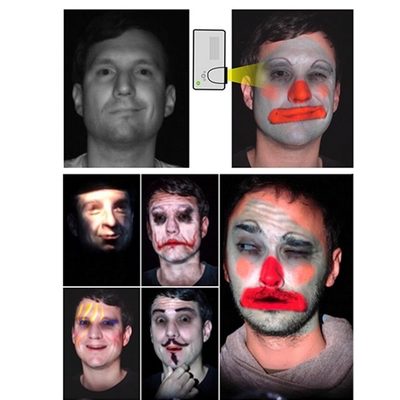
assets/research-makeup-lamps.jpg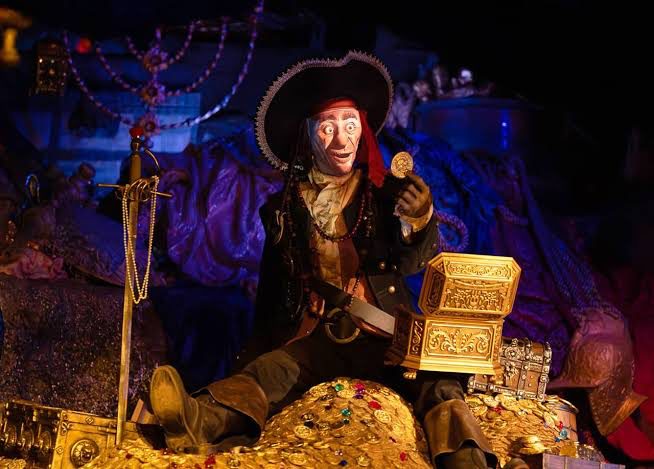
assets/research-disney-pirate.jpg
assets/research-iaapa-themedmotion.jpgassets/research-iaapa-themedmotion.mp4| Aspect | Disney · Pirates | P&P × ThemedMotion × 7thSense | This project (rev. 1) |
|---|---|---|---|
| Where the head pose comes from | Animation data in real time, corrected by camera tracking | Measured by motion-capture cameras, up to 240 Hz | Commanded pose, polled from Bottango's local API |
| Markers | UV-fluorescent, hidden in costume; used for calibration at night | Tracking markers not visible to guests (IR inferred) | None; calibrated by eye with projected landmarks |
| Renderer | Unreal Engine | 7thSense Actor media server | Blender Eevee |
| Projection | Two projectors, hot standby | Enterprise projectors, high frame rate | One consumer 1280 × 720 LCD projector |
| Calibration | Projected grid; daily recalibration with sensors | Scalable Displays auto-calibration | Landmarks projected from Blender and aligned by hand to the print |
| Face surface | 3D-printed shell, articulated jaw | Sculpted animatronic head | 3D-printed scan, no facial articulation |
| Cost class | In-park flagship | Turnkey enterprise product | Student proof of concept |
What the research changed in my design
- Use both commanded and measured pose. Disney combines animation data, which arrives instantly, with camera tracking, which catches what actually happened. My first revision only has the commanded pose. The encoders planned for revision 2 (Section 09) add the measured half at a fraction of the cost of a motion-capture rig.
- Latency is the budget that matters. Makeup Lamps needed 9.8 ms and motion prediction; 7thSense updates at up to 240 Hz. For a head turning at angular speed ω with a total delay τ between pose and photons, the image trails the surface by:
A 30° per second head turn with 50 ms of combined polling, render and projector delay, at 0.15 m from the pivot and 0.39 mm per projector pixel. This is why the neck motion in the demo is slow and smooth, and why prediction from the known animation curve is on the roadmap: Bottango knows where the head will be next, so the twin can render slightly ahead.
- Hide the machinery. Both professional systems keep their markers out of the guest's view, using UV markers that only appear at night or infrared markers that never appear. My current revision has no markers at all, because it is calibrated by eye. If a future revision adds camera tracking with fiducial markers, those markers will need to be hidden in the same way.
- Calibrate every day and design for failure. Disney recalibrates daily and runs a standby projector. Operations are part of the design, not an afterthought.
- Keep only the mechanism you need. Disney kept the jaw and cut the nose. My head has no jaw, and the static lips are the weakest part of the illusion (Section 06). A single jaw actuator is the most valuable mechanical addition after the neck.
The professional systems differ in where they get the pose. Disney trusts the animation and checks it with cameras; 7thSense measures everything. This project shows how far commanded pose alone can go, and where it stops.
Why it matters for attractions
- Cost and reliability. A face with no moving skin has no skin to tear and no facial linkages to wear out.
- Content agility. A new character, costume or makeup is a file, not a new sculpt, as Disney's transforming pirate shows.
- Maintenance. The parts that can fail (projector, tracking and neck) are serviceable from behind the figure.
What it has to overcome
- Registration and latency. Any movement the twin does not know about, or learns about too late, shows up as the face sliding off the head.
- Brightness. Projection competes with ambient light, so the scene must be designed around it.
- Static relief. Sculpted lips stay closed while projected lips open. The animation must respect what the form can sell.
One head, two twins
There are two copies of the head: the print on the neck and the model in Blender. The system's whole job is to keep them identical in pose and to light the print with exactly what the model looks like at that instant. Motion is authored in Bottango, which drives the servos over USB serial through an ESP32 and a PCA9685 servo board. A companion add-on polls Bottango's local HTTP API for the same pose, so the twin follows the physical head rather than the other way round.
Three Blender add-ons were written for the face. They are deliberately independent so each can be used, tested and removed on its own, but they share one head material and cooperate in a fixed order: overlays first, then the expression warp and mouth interior, with the eye rig on its own eyeball materials. Every control is an animatable property, so the whole performance is one Blender timeline that loops seamlessly.
From scan to projection surface
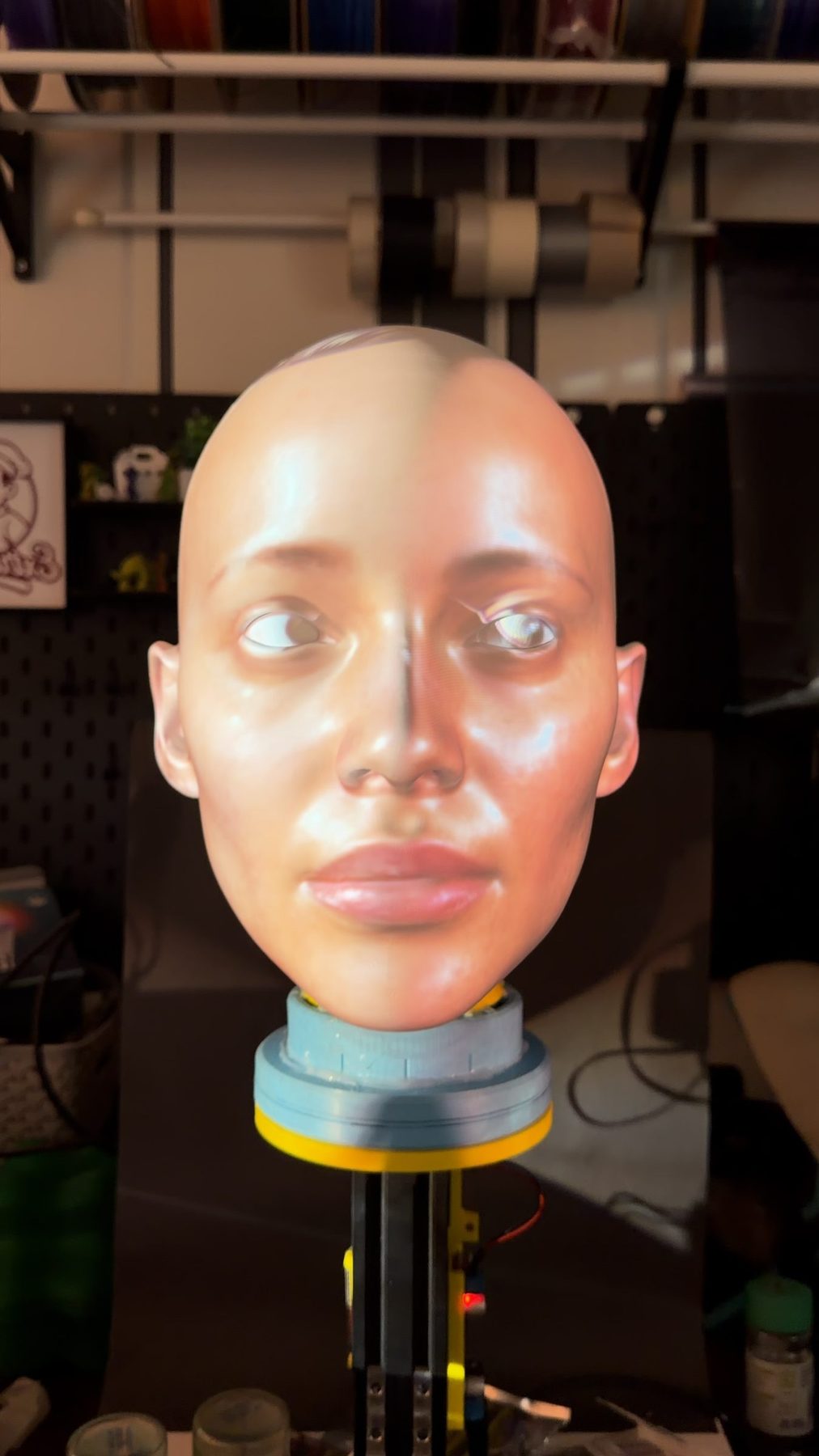
The digital head and the physical head start from the same file. The scan is printed, finished as a projection surface, mounted on the servo neck, and set up in front of the projector. Every later step depends on the print matching the model, so the build is documented step by step.
assets/build-hero.jpg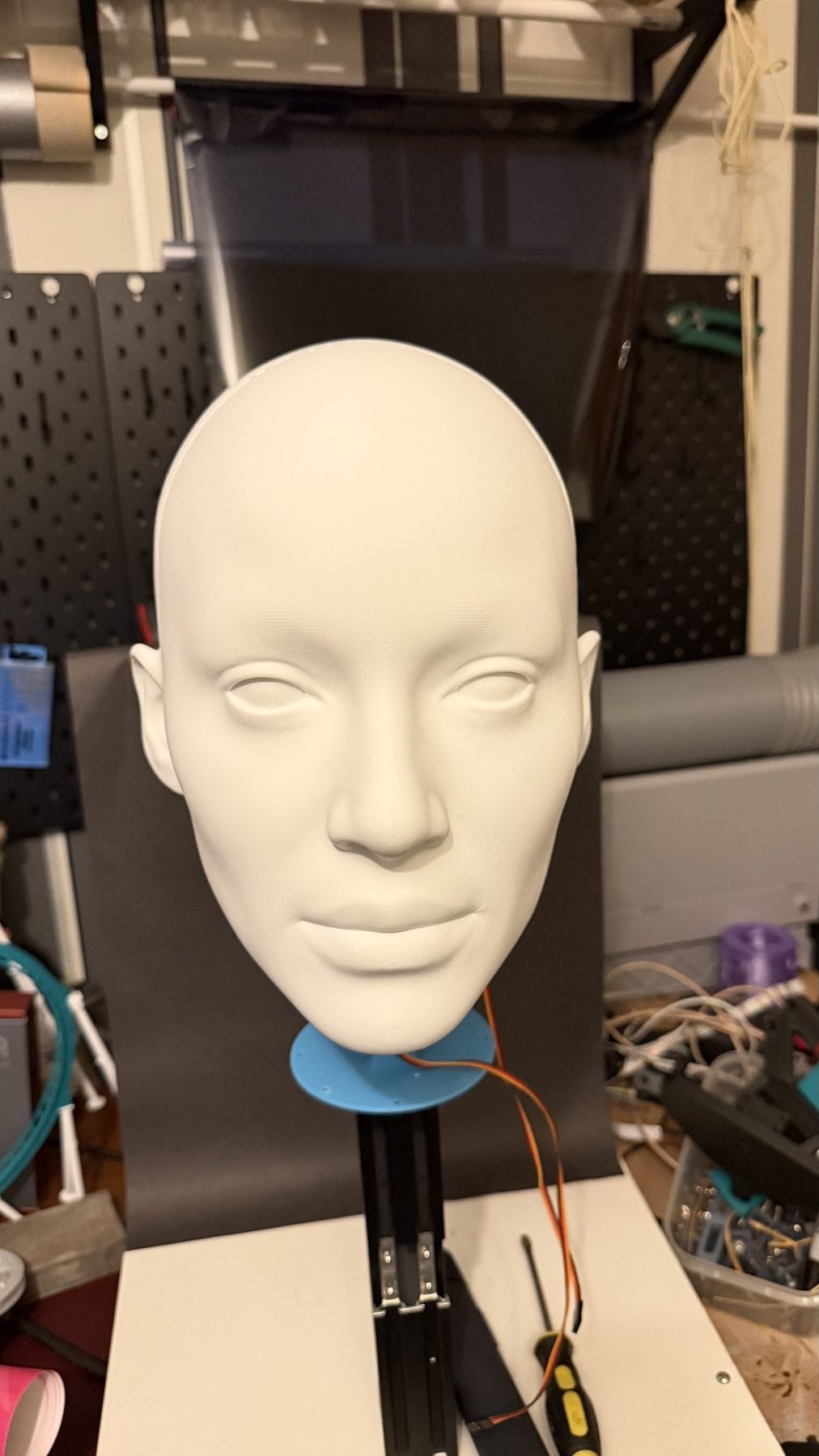
assets/build-01-print.jpg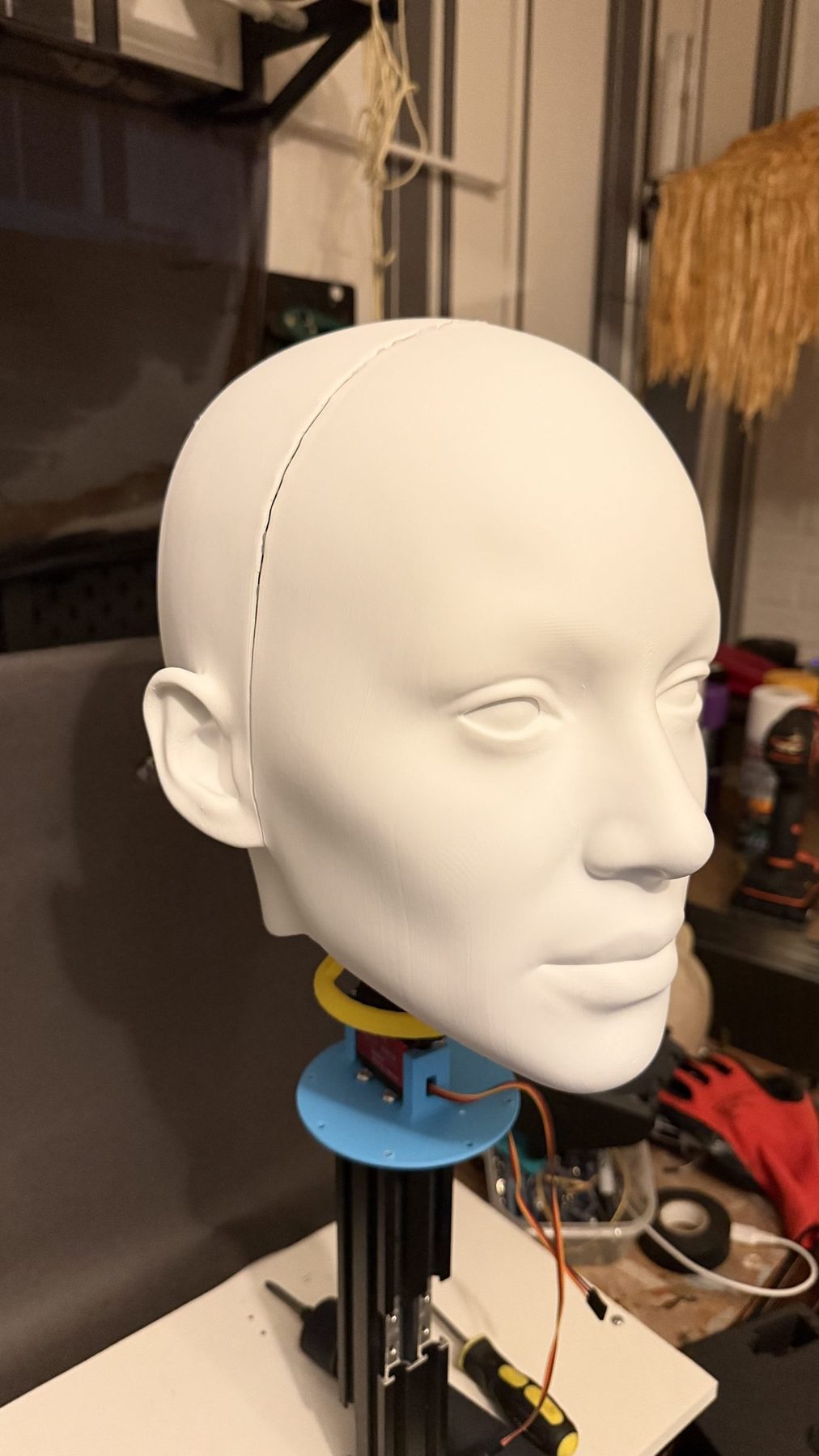
assets/build-02-finish.jpg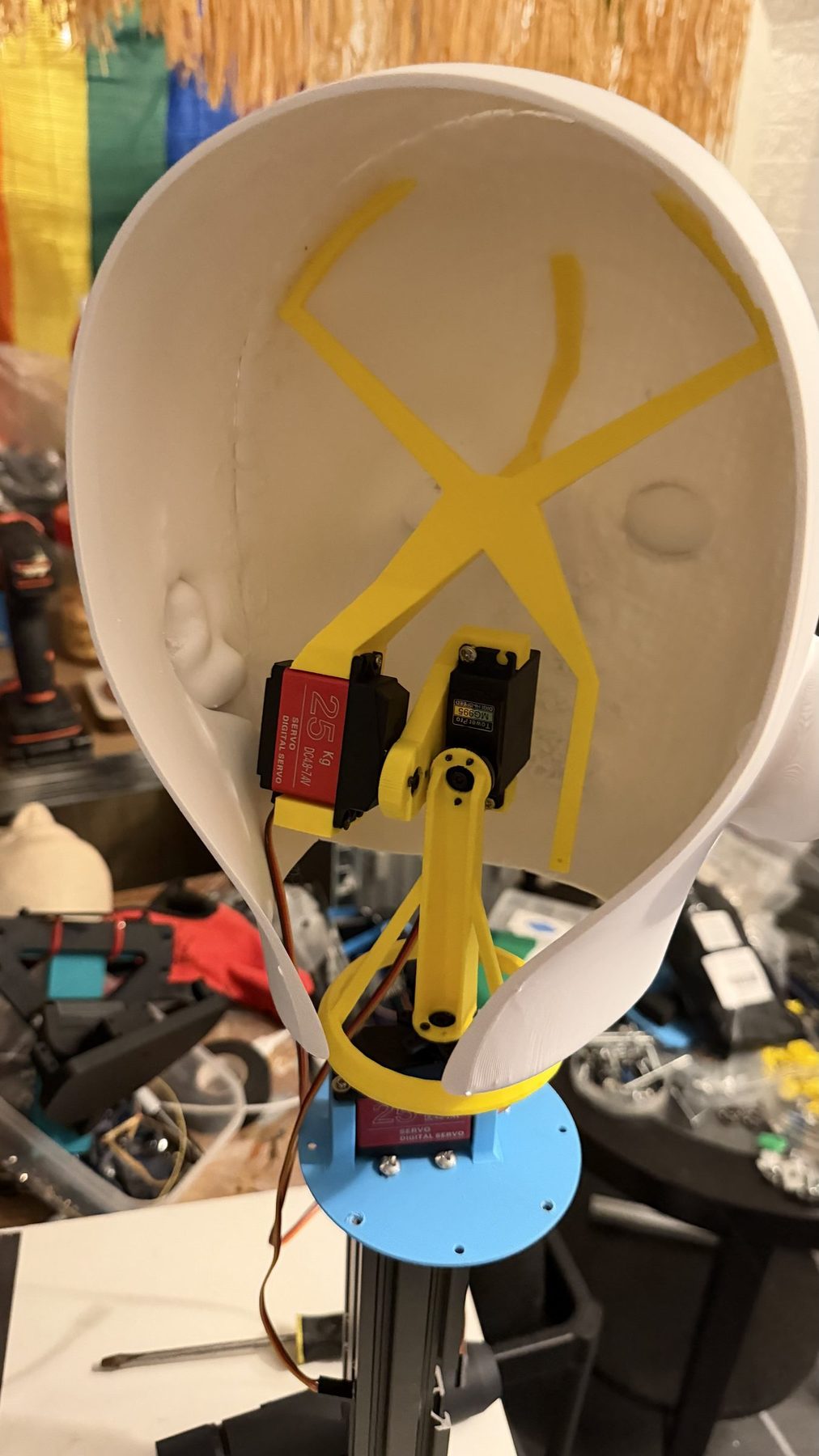
assets/build-03-neck.jpg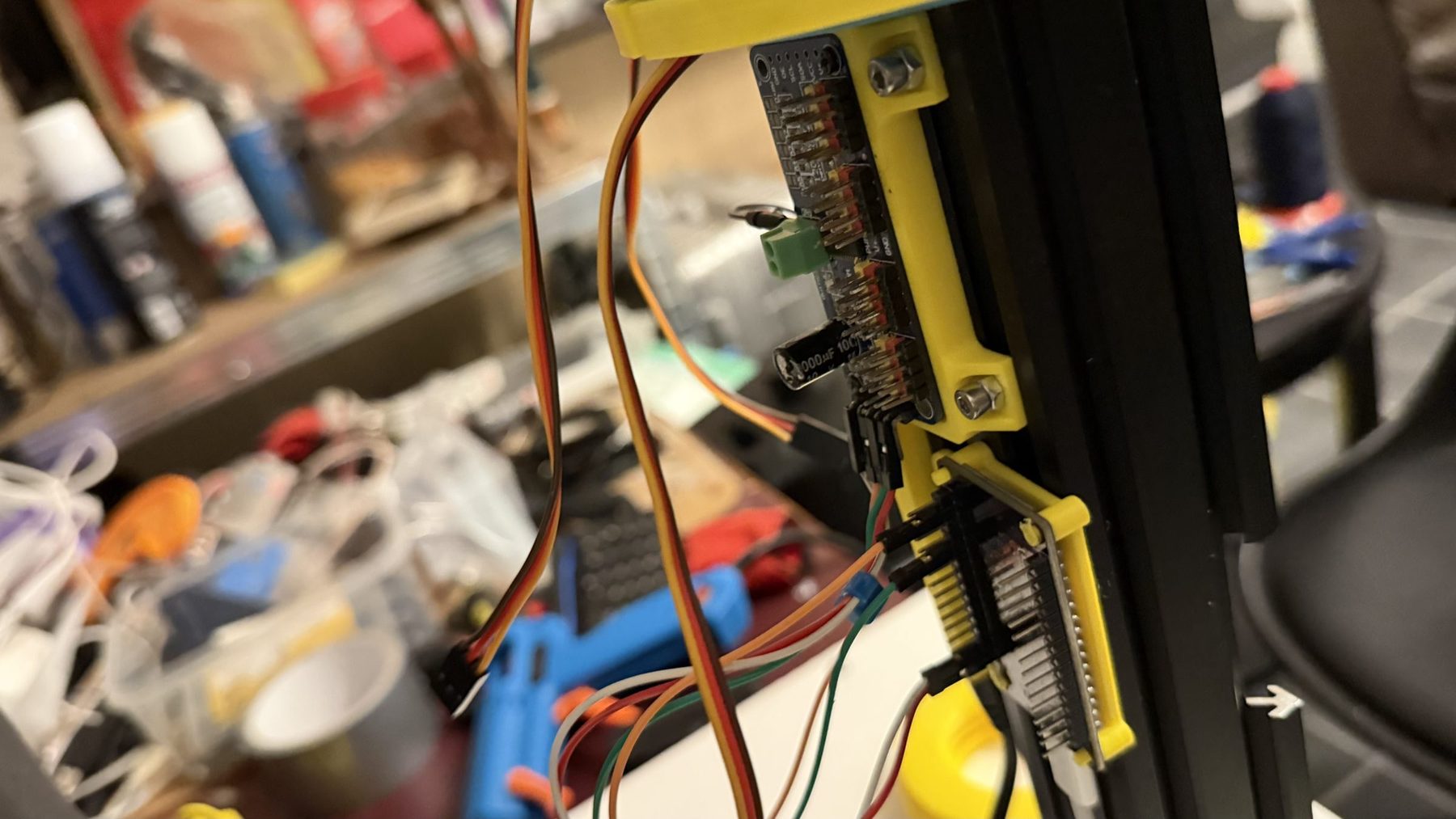
assets/build-04-electronics.jpg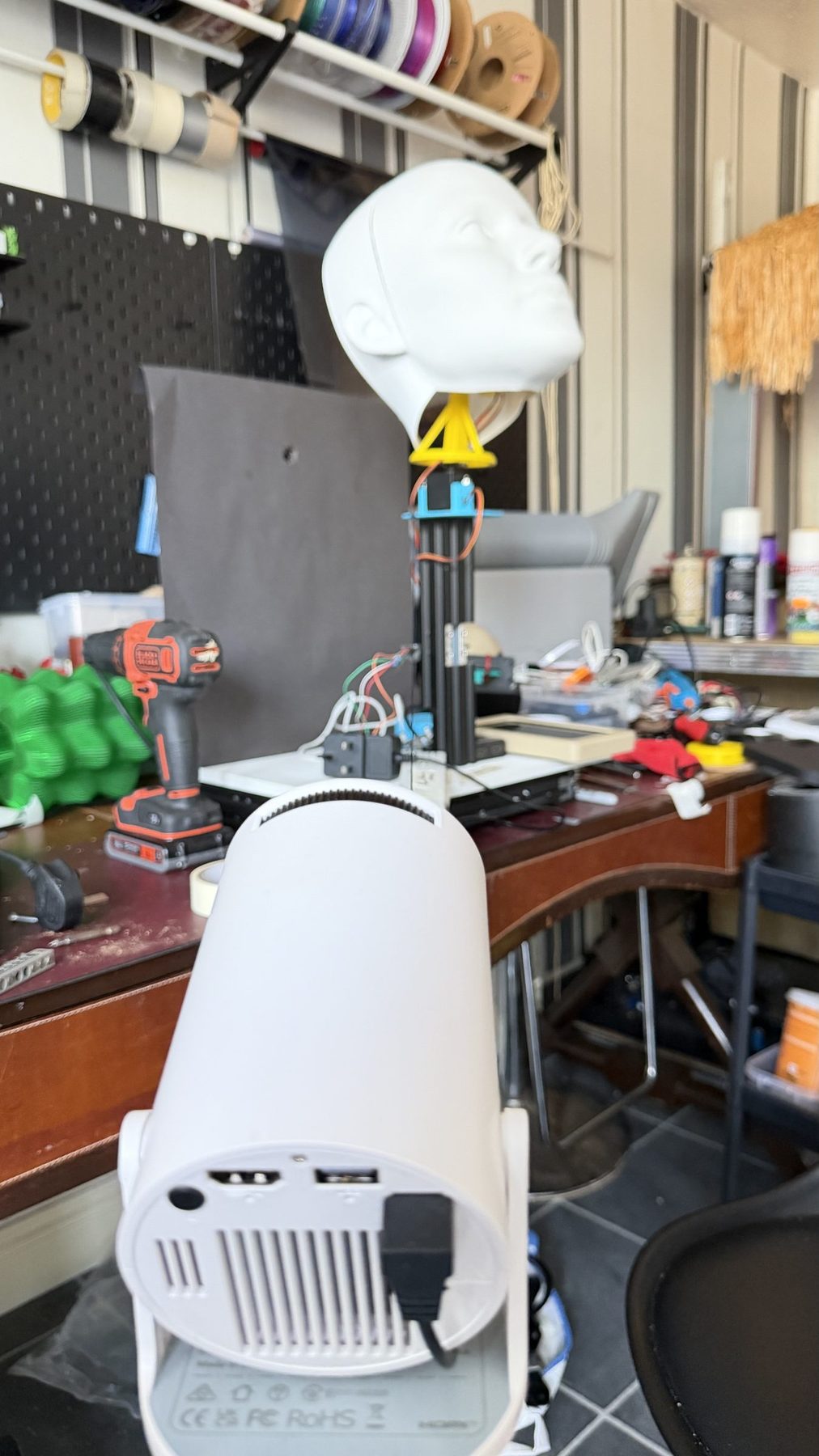
assets/build-05-projector.jpgCalibrating by landmarks
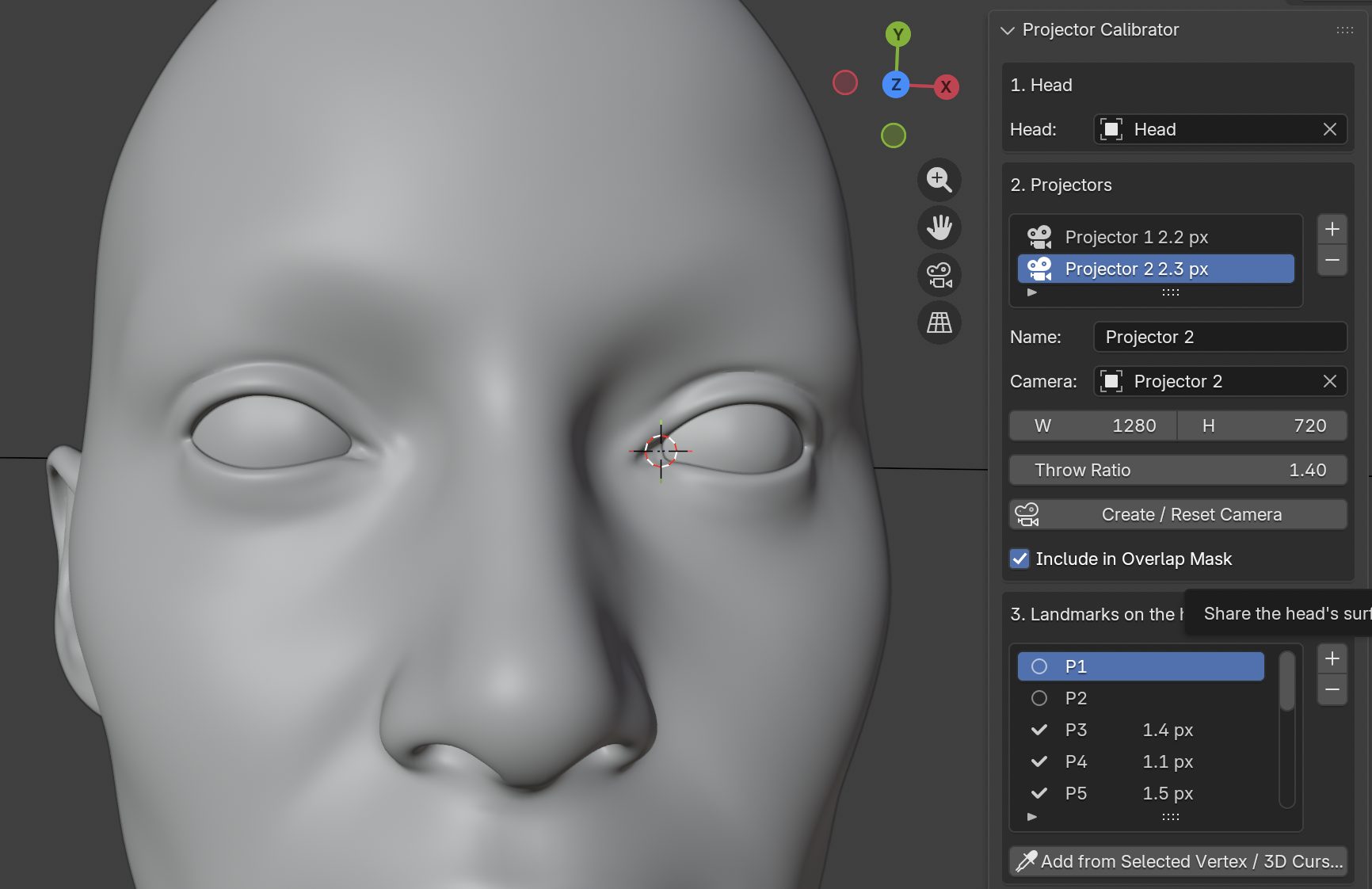
The projector is aligned to the head from inside Blender. Landmarks are placed on distinct features of the digital head, projected through the virtual projector camera onto the print, and the camera is adjusted until every landmark lands on its physical feature. The sequence below shows the process from first projection to final alignment. The film at the top of the page shows the aligned result running.
assets/calib-01-landmarks.jpg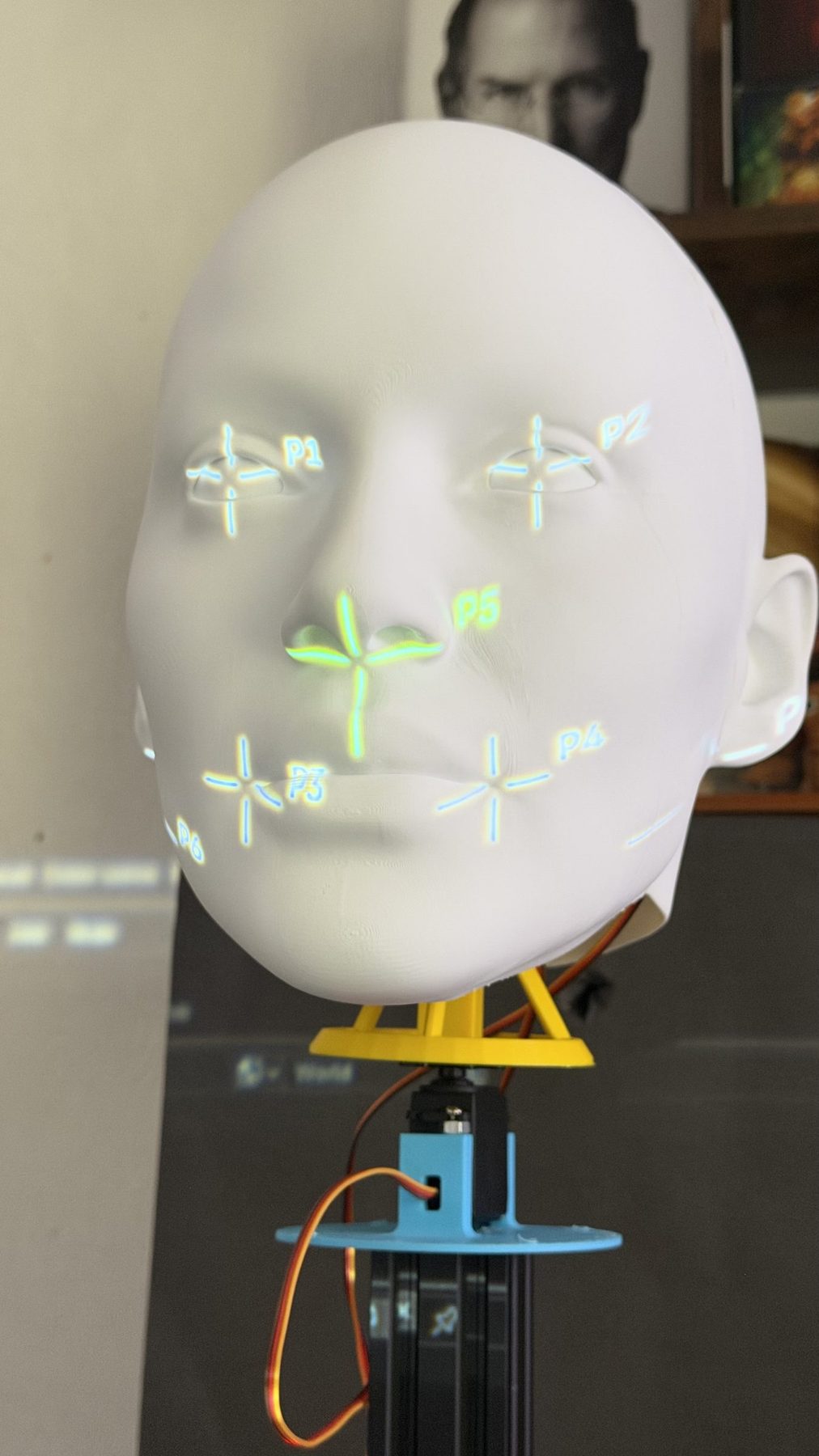
assets/calib-02-first-projection.jpg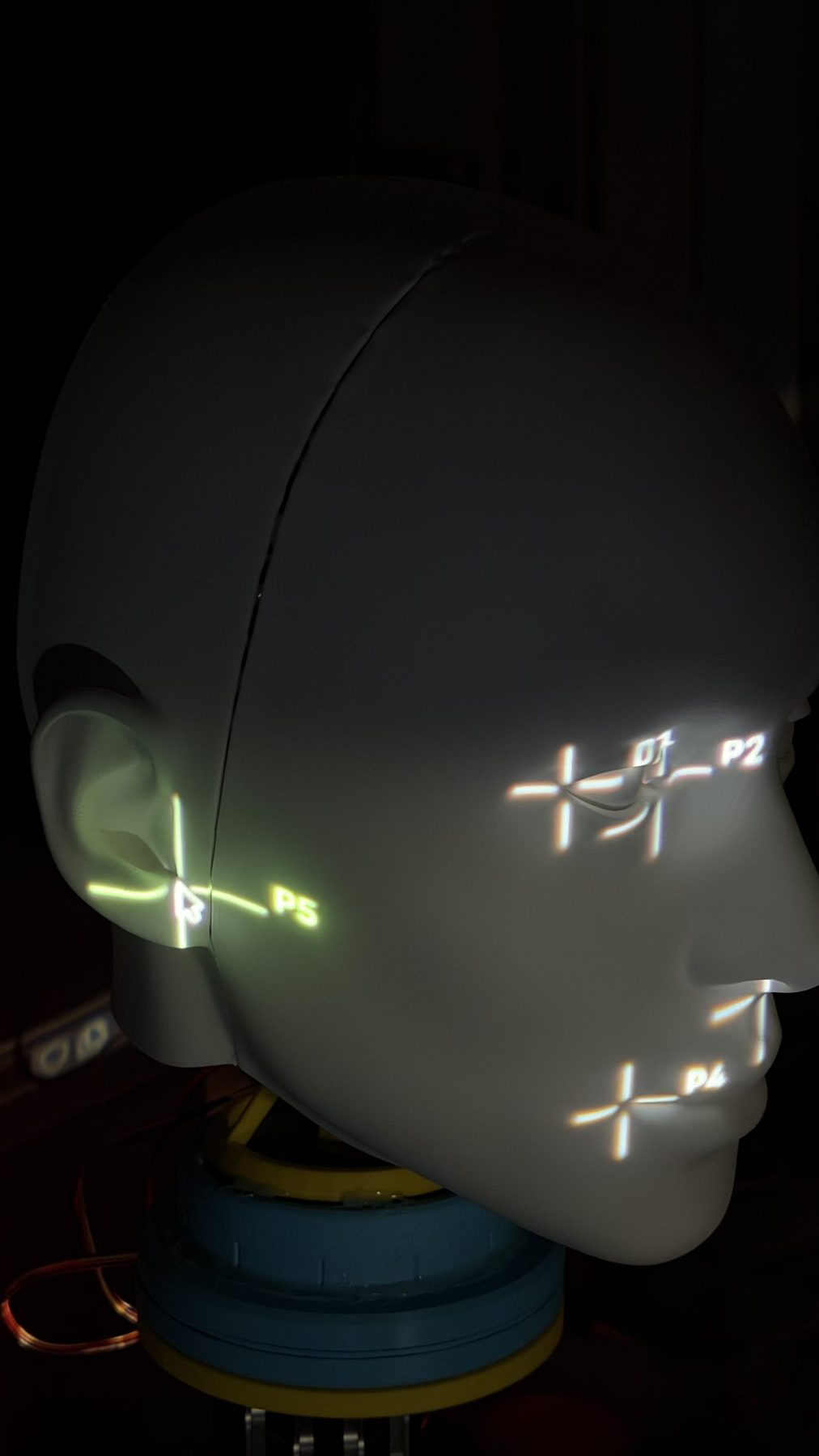
assets/calib-03-adjusting.jpg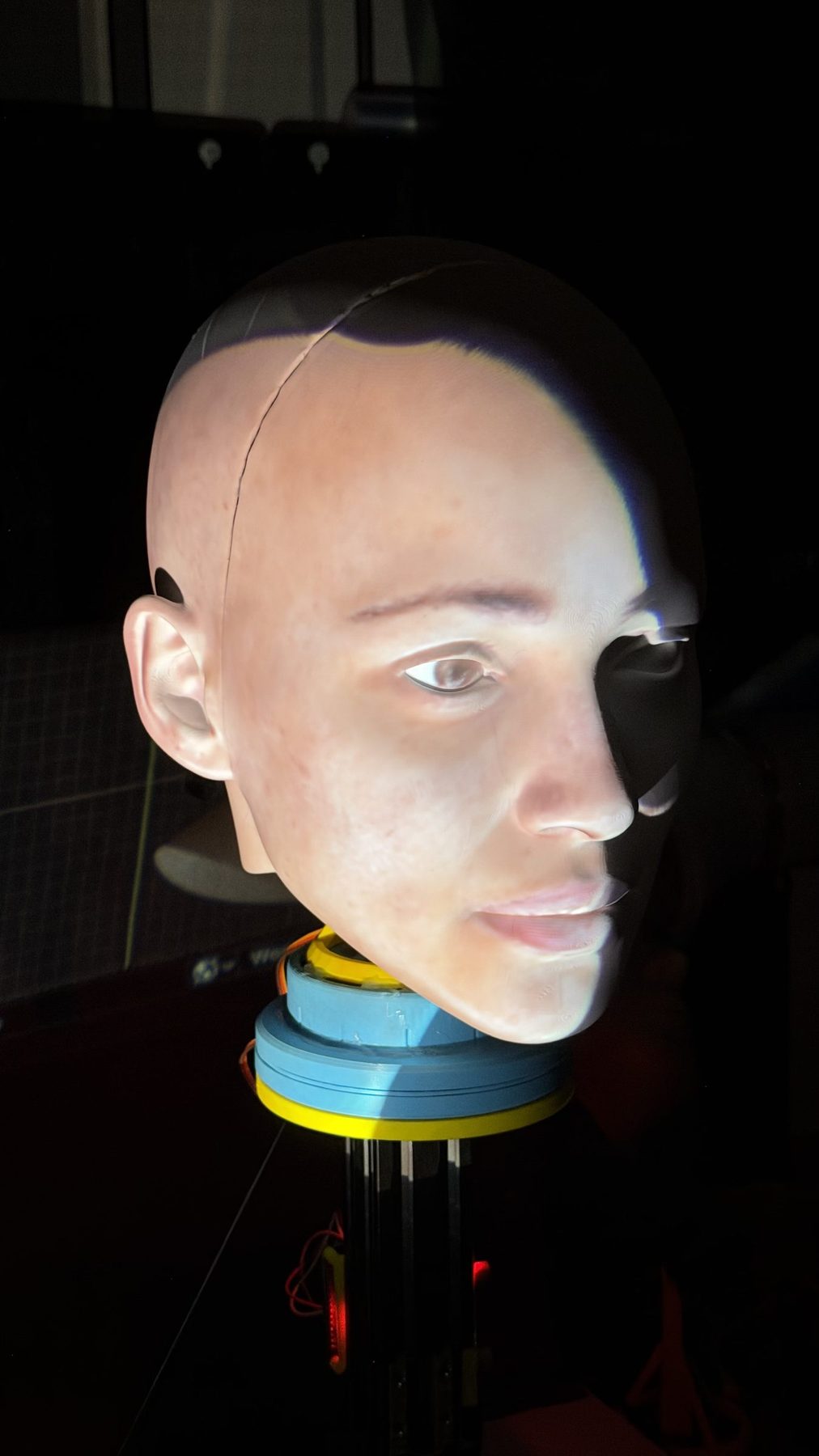
assets/calib-04-aligned.jpgAnimating a neck like a performer
The face is made of light, but the figure still has to move, and that part is a conventional animatronics problem: an animation tool, a controller, a set of actuators, and the question of whether the figure actually went where it was told. This project uses that same chain at hobby scale, which makes it a small working model of how a show figure is programmed and where its motion goes wrong.
Projection mapping raises the bar on that chain. A sculpted face hides a degree of positional error; a projected face exposes it, because the image is drawn for where the head should be. Every choice below is judged by one question: how far does the real head end up from the pose the twin in Blender is rendering?
Bottango: animating on a timeline
Bottango is animation software built for animatronics. Instead of writing motion code, each actuator is defined once (its type, the controller pin it is wired to, its signal range and its home position) and then animated with keyframes and curves on a timeline, the way an animator works in Blender or Maya. Bottango sends the result to microcontroller boards, Arduino and ESP32 among them, running its open-source driver firmware, either live from the computer while animating or as an exported animation that the board can play on its own.
Here, Bottango's driver runs on an ESP32, which generates the servo pulses through a PCA9685 16-channel PWM board. The three neck axes are defined as three MG996R servos on that board, each with a signal range that keeps the head inside the travel its mount allows. The neck performance is keyframed in Bottango and played live from the computer over USB serial.
- Curves, not just positions. Every keyframe has curve handles, so speed, ease-in and ease-out are authored by the animator rather than left to the actuator's own behaviour.
- Limits belong to the rig. Travel limits live in the actuator definition, so no animation can command a pose the mechanism cannot reach.
- Audio on the same timeline. Bottango can play a soundtrack alongside the animation, which is how head and jaw motion is timed to dialogue. In this project speech lives in the projected face; the planned jaw actuator would be keyframed against the same audio.
- One timeline, many actuator types. Servos and stepper motors are animated the same way, so moving the neck to steppers in revision 2 changes the hardware definition, not the performance.
Following Bottango in Blender
The twin never touches the serial cable, which only carries commands to the servos. Instead, a companion add-on asks Bottango's local HTTP API for its playback state many times a second, on a background thread so a slow reply never freezes Blender. Each reply lists every effector with its movement, a value from 0 to 1 giving its position within its configured range, along with the animation name, whether it is playing and the playback time.
Every poll is stored with its arrival time in a buffer of the last 256 samples. A timer in Blender reads that buffer as it was a set delay ago, interpolating between the two nearest samples so motion stays smooth even when replies arrive unevenly. The delay lets the twin trail Bottango by the same amount the physical servo trails its command. Each mapped effector then becomes a rotation on one axis of the head, using a range calibrated against the real neck:
m is the effector's movement read a delay δ in the past, interpolated between samples; θ0 and θ1 are the calibrated rotations at movement 0 and 1, and an Invert option flips m first. Pan, for example, is written to the head's Y rotation. If Bottango stops reporting a mapped effector, only that row shows an error and the others keep following; network failures are counted and retried on the next poll.
The limit is in the data itself. Bottango reports the commanded position, not the measured one, because a hobby servo has no feedback to give. The delay and the range calibration make the twin match a servo that behaves; if the servo overshoots or rocks through backlash, Blender cannot see it. That gap is the case for revision 2.
Why the curve shape matters
An eased move, modelled here as a smooth cubic between two keyframes, starts and stops with zero velocity. Its peak speed and peak acceleration are:
A 30° turn over one second peaks at 45° per second and 180° per second squared. A linear move of the same length asks for an instant change of speed at each end, which in a real neck becomes a jolt that throws the head through any play in the drive. Smooth curves are not only a performance choice; they are part of keeping the face registered.
Hobby servos: a closed loop you cannot see into
The neck uses MG996R servos, a common metal-geared hobby servo. Like any hobby servo, it is a small DC motor, a gear train, a potentiometer on the output shaft and a control board in one case. The controller, here the PCA9685 on the ESP32's instruction, sends a pulse every 20 ms (50 Hz), and the pulse width, typically somewhere between 1000 and 2000 µs, sets the target angle. The servo's own board compares that target with the potentiometer and drives the motor until they agree.
So a servo is already closed-loop, but the loop is sealed inside the case. The controller never learns where the output actually is. The board also ignores small errors on purpose, a deadband that stops it buzzing around the target, and together with play in the gears this lets the head move under its own weight without the servo reacting.
Pulse width p mapped across the servo's travel Θ. The MG996R's published deadband is 5 µs, so the output can sit about 0.9° from its target without the servo correcting. At the eyes, 0.15 m from the tilt pivot, that is roughly 6 projector pixels before any gear play is counted, and metal gears still have play (see the error budget in section 09).
Steppers: open loop and closed loop
A stepper motor moves in fixed increments. A driver energises its coils in sequence, and each pulse on its step input advances the shaft by one step, 1.8° for a common 200-step motor; a second input sets the direction. Microstepping shapes the coil currents to place the rotor between full steps, which makes motion smoother and quieter. It improves smoothness more than accuracy, though: under load the rotor lags the commanded microstep, so the real resolution is coarser than the step count suggests.
A plain stepper is open loop. The controller counts the pulses it has sent and assumes the motor followed. When the load is within the motor's torque, that assumption holds and the shaft holds position firmly with no gear play. When a move asks for more torque than the motor has, it skips steps, nothing notices, and every later move is off by the same amount until the axis is homed again.
A closed-loop stepper adds an encoder on the motor shaft and a driver that compares measured position with commanded position, correcting the error before it becomes a lost step or raising a fault if it cannot. It keeps the stepper's strong low-speed torque and simple step-and-direction interface, so the controller side barely changes, and gains the servo's ability to know where it is. For a figure whose job is to repeat the same performance exactly, many times a day, that is the property that matters.
| Criterion | Hobby servo | Open-loop stepper | Closed-loop stepper |
|---|---|---|---|
| Command signal | Pulse width at 50 Hz | Step and direction pulses | Step and direction pulses |
| Feedback | Potentiometer inside the case, not readable by the controller | None | Shaft encoder at the driver |
| Position at power-up | Known: the potentiometer is absolute | Unknown until homed | Unknown until homed, unless the encoder is absolute |
| How it goes wrong | Deadband and gear play; hunts or buzzes under load | Skips steps silently; error persists until rehomed | Corrects the error, or stops and reports a fault |
| Holding | Corrects only outside its deadband | Full holding torque while powered | Holding torque, with current managed by the driver |
| Good fit | Prototypes, props and light axes | Axes with a known, steady load | Axes that must repeat precisely under changing load |
Wiring the figure
Everything above happens in software until it reaches a wire. The figure has three kinds of connection: data that tells the neck where to go, power that lets it get there, and video that becomes the face. Keeping those three apart on paper is the first step to keeping them apart in the build, because most hobby animatronics faults are a power problem that looks like a software problem.
The three neck servos plug into channels 0, 1 and 2 of the PCA9685 board. The PCA9685 talks to the ESP32 over I²C. The servos are powered from a separate 5 V rail made by a buck converter from an external 24 V supply, fed into the PCA9685's V+ terminal, so servo current never passes through the ESP32. The ESP32 is connected to the show master, today a MacBook Pro, by a USB-C cable that carries both serial data and the ESP32's own power. The same MacBook drives the projectors over HDMI. The rig is laid out for at least two projectors, one either side of the face.
What travels on each wire
It is tempting to imagine the computer sending the servo an angle sixty times a second. It does not. Each hop speaks a different language, and the work of turning an animation into motion is shared out along the chain.
| Hop | Physical link | What it carries | How often |
|---|---|---|---|
| Mac → ESP32 | USB-C cable, USB serial | Bottango's text commands. On connect, a handshake and a registration for each servo: the PCA9685 address (0x40), its channel, its pulse range and its speed limit. During playback, each upcoming stretch of animation as a cubic Bézier curve with a start time and a duration, plus time-sync messages. While scrubbing or dragging a slider, immediate position updates. | In bursts: a few messages per curve segment, not a stream of frames |
| ESP32 → PCA9685 | I²C: SDA, SCL and ground, 3.3 V logic | Register writes. At start-up, the prescaler that sets the 50 Hz period. Then, per channel, the 12-bit counts at which its output turns on and off in each period: four bytes per servo. | Whenever an evaluated curve changes value, many times a second |
| PCA9685 → servos | Three-wire servo lead: signal, 5 V, ground | A pulse train whose width is the target angle, around 1000 to 2000 µs and trimmed per axis in Bottango. The PCA9685 makes the pulses in hardware, so timing jitter on the ESP32 never reaches the servo. | Continuously, 50 pulses a second per channel |
| Buck → PCA9685 V+ | Screw terminal on the board | 5 V DC for the servo motors only. The PCA9685 passes it straight through to the servo headers. | Continuous, in surges of amps |
| Bottango → Blender | Local HTTP on the same Mac, 127.0.0.1:59224 | GET /PlaybackState/ returns each effector's movement from 0 to 1, the animation name, whether it is playing and the playback time (equation 1). | Polled many times a second |
| Mac → projectors | HDMI, one output per projector | The Eevee render from each virtual projector camera, full screen at the projector's native 1280 × 720. | Every display refresh |
The interesting design decision is in the first row. Bottango does not stream positions; it streams curves. The driver on the ESP32 keeps its clock in step with Bottango's and evaluates each curve itself, so a USB hiccup delays the next instruction rather than the current motion. It is the same split a professional figure controller uses: the show computer describes the performance, and the controller nearest the actuators is responsible for timing.
The PCA9685 then sets the finest step the neck can take. At 50 Hz each 20 ms period is divided into 4096 counts, so one count is 4.88 µs. With the mapping in equation (3), that is about 0.9° per count, almost exactly the MG996R's 5 µs deadband. Neither the board nor the servo can resolve a finer angle, which is one more reason revision 2 moves to steppers rather than to a better PWM board. The board's internal oscillator is nominally 25 MHz, which gives a prescaler of 121, but it varies from chip to chip by a few percent. Every pulse width scales with that error, so the period is worth measuring once and correcting in firmware before the pulse ranges are calibrated.
Power: why 24 V in and 5 V out
An MG996R can draw around 2.5 A when stalled, and a stall is exactly what happens when the head reverses direction or hits a limit. Three of them can ask for 7.5 A at once. A laptop's USB port supplies well under 1 A, and the ESP32's 5 V pin is not built for this, so servo power comes from its own supply.
The 24 V supply is the standard voltage of industrial control gear and loses less in long cables. The buck converter sits close to the board and is rated for the combined stall current, not the average. A large electrolytic capacitor on the V+ terminal covers the start-up surges that would otherwise dip the rail and make the servos twitch.
Logic levels and ground
The PCA9685's logic side is powered from the ESP32's 3.3 V pin, so its I²C lines and PWM outputs run at 3.3 V and never push 5 V back into the ESP32. The 5 V rail is connected only to V+, never to the logic VCC pin.
Every ground is joined: the supply, the buck, the PCA9685 and the ESP32. A pulse is a voltage measured against ground, and a servo whose ground is separate from its controller's sees noise instead of a command. The PCA9685 also has an output-enable pin that switches off every PWM output at once, a useful hook for a software stop. It is not an emergency stop: with no pulses the servos go limp, and the head can fall under its own weight.
Why at least two projectors
A single projector at 45° to the head lights one cheek well and grazes the other, where each pixel is stretched across the surface and dimmed by the angle. Two projectors, one either side, give every part of the face a beam that meets it close to head-on. Each projector has its own matched camera in Blender and its own HDMI output. Where the beams overlap down the middle of the face, each render has to be faded by how directly its projector faces the surface, so the two halves blend into one image instead of a doubly bright seam. Because those blend weights come from the posed twin, they can be recalculated every frame, and the work shifts from one projector to the other as the neck turns.
The whole system: Bottango, Blender and the ESP32
Two pieces of software run the show, and they have different jobs. Bottango owns the motion: the timeline, the curves and the limits. Blender owns the light: the twin, the eyes, the expressions and the projector views. Bottango tells the ESP32 what to do over serial and tells Blender what it told the ESP32 over HTTP. Blender never talks to the hardware, and nothing in the chain talks back from the servos.
The controls
Every adjustment on the figure lives in one of four places. Knowing which one is how a fault gets fixed in the right layer instead of being patched in the wrong one.
| Control | Where it lives | What it changes |
|---|---|---|
| Play, stop, scrub | Bottango timeline | Runs the performance. Curves go to the ESP32 and playback state goes to Blender. |
| Manual sliders | Bottango, per effector | Moves one axis live for setting home and checking travel, sent as immediate position updates. |
| Pulse range, home, speed limit | Bottango actuator definition | The hard limits of each servo. No keyframe can command a pose outside them. |
| Delay, range at 0 and 1, invert | Blender follower add-on | How the twin tracks the real neck in time and angle (equation 1). |
| Gaze, blink, vergence, lid rest | Eye Rig add-on | The eyes, drawn in light. |
| Expression presets and intensity | Face Expressions add-on | Smiles, speech and brows, by texture warp or scanned shapes. |
| Face playlist and crossfades | Face Overlays add-on | Which painted face is shown, and when it changes. |
| Projector camera pose and lens | Blender cameras A and B | Registration of each projector to the print (section 05). |
| 24 V supply switch | On the bench | The only control that truly removes power from the neck today. |
From a MacBook to a show control system
For development, a laptop as show master is ideal: every curve, delay and face can be changed while the head is running. For a figure in an attraction it is the wrong architecture. One computer is a single point of failure, the figure hangs off a consumer USB cable, motion and video keep time with two separate clocks inside two applications, and the only way to stop the neck is to pull its power. A production figure runs thousands of cycles a day, mostly unattended, and has to fail safe every time. Getting there changes how the system is organised, not only which parts it uses.
- One clock for everything. A dedicated show controller (an Alcorn McBride V16X or a Medialon system, for example) runs the cue list and distributes timecode, as SMPTE LTC or network time. The figure controller and the media server both chase it, so motion and video are locked to the same frame instead of Blender inferring the neck's position by polling.
- Pre-render what is fixed. A scripted performance does not need Blender at show time. Its projector views can be rendered to frame-accurate media and played by a media server such as 7thSense or disguise, with a hot-standby unit that takes over if the first fails. Bottango can export an animation to run on the controller itself, so the figure plays from its own memory on a cue. Live rendering stays for interactive shows, where tracking decides what the face does.
- Industrial links instead of USB. USB is short, sensitive to electrical noise and can drop and re-enumerate when disturbed. Show systems use differential and network links: RS-485, DMX512 or Art-Net and sACN for simple channels, and Ethernet fieldbuses such as EtherCAT for servo drives, with cues arriving by OSC, MIDI Show Control or TCP.
- Safety that does not depend on software. A hardwired emergency-stop chain and a safety relay or safety PLC remove actuator power whatever the show computer is doing. The safety functions are rated to a performance level under ISO 13849-1, chosen from a risk assessment, and the control system follows the electrical and control requirements of ISO 17842-1 Annex A where the figure is part of a ride.
- Watchdogs and safe states. The figure controller expects a heartbeat from the show controller. If commands stop, it eases the figure to a parked pose and holds or powers down, rather than freezing mid-move. A lost video feed dims the projectors and parks the neck, as described in section 08.
- Feedback and monitoring. Closed-loop actuators report measured position, so the controller can fault when the following error grows (the case made in section 09). Faults are logged, show status is visible remotely, and operators get a simple panel: start, stop, reset and a maintenance mode with lower speeds.
- Power built to last. DIN-rail 24 V supplies, a fuse per actuator, surge protection and tidy, strain-relieved cabling, with the controllers on a UPS so a mains blip ends the show cleanly instead of mid-move.
| Concern | This prototype | A show-ready figure |
|---|---|---|
| Show master | MacBook Pro running Bottango and Blender | Dedicated show controller with a cue list and timecode |
| Timing | Blender polls Bottango; delay δ tuned by eye | Motion and media chase the same timecode |
| Link to the figure | USB serial from a laptop | RS-485 or Ethernet to a figure controller |
| Video | Live Eevee render over HDMI | Media server, pre-rendered and edge-blended, with hot standby |
| Position feedback | None: commanded position only | Encoders, with a fault on following error |
| Stopping | Switch off the 24 V supply | Hardwired emergency stop and safety relay, independent of software |
| If the computer crashes | Neck holds its last pose; projected face freezes | Watchdog parks the figure, projectors dim, fault is logged |
| Start of day | Open both apps, connect, check alignment by eye | One cue: self-test, home, automated alignment check, ready |
Treating the projector as a camera
A projector is optically a camera run backwards: each pixel is a ray leaving a single centre of projection. If Blender's camera uses the same ray geometry as the real projector, every rendered pixel lands on the physical surface point that the virtual camera saw. That is the whole trick, and it reduces to the standard pinhole model.
X is a point on the head in world space, (u, v) the projector pixel that lights it, K the projector's intrinsics and [R | t] its pose. The focal length in pixels follows from the throw: f = W · D / w, where W is the panel width in pixels, D the throw distance and w the width of the projected image at that distance.
Matching Blender's camera
Blender describes the same model in millimetres and normalised lens shift. Compact projectors throw their image upwards from the lens axis, so the principal point is not at the image centre, and that offset becomes a vertical shift on the virtual camera.
S is the virtual sensor width with horizontal sensor fit. Blender normalises both shifts by the larger image dimension, which is W for a 16:9 projector. The sign of shifty depends on whether pixel rows are counted from the top.
Finding the pose
The projector has no camera of its own, so the current revision is calibrated by placing landmarks from Blender. Distinct points on the digital head, such as the nose tip, the eye corners and the chin, are projected through the virtual projector camera onto the real print. The virtual camera's position, rotation, focal length and lens shift are then adjusted until every projected landmark sits on its physical counterpart. The human eye is the sensor: when the landmarks line up from the guest's viewpoint, the face does too.
Aligning by eye is a manual way of solving the same problem a computer-vision system would solve numerically. Each landmark is a point on the head that should land on a known spot in the projector's image, and good alignment is the pose that brings every landmark as close to its spot as possible. A future revision could automate this with a camera and fiducial markers, such as ArUco tags, and OpenCV's solvePnP, which finds that pose directly and can repeat the calibration every morning.
What an error costs
The same model shows how unforgiving registration is. A projected pixel's footprint on the head is roughly w / W. With the image about 0.5 m wide across the head, a 1280-pixel panel puts one pixel at roughly 0.39 mm. A human iris is about 11.7 mm across, so it is only about 30 projector pixels wide. A misalignment of a few millimetres is therefore a large fraction of an eye, and the guest reads it immediately as a face that has slipped. This sensitivity is what drives the next mechanical revision.
Moving a face that cannot move
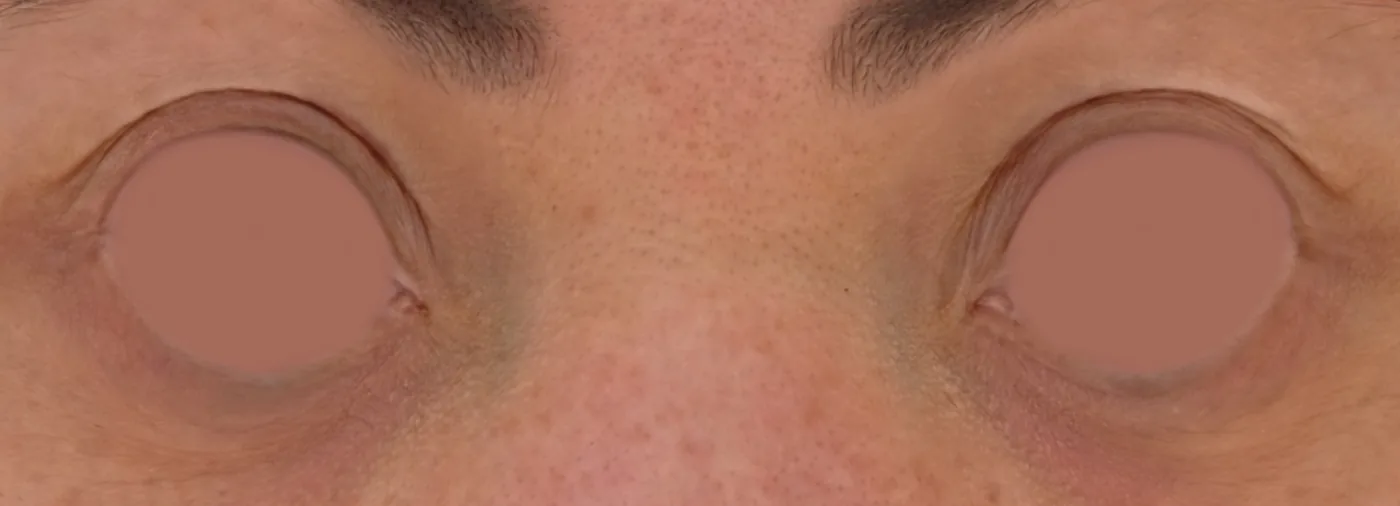
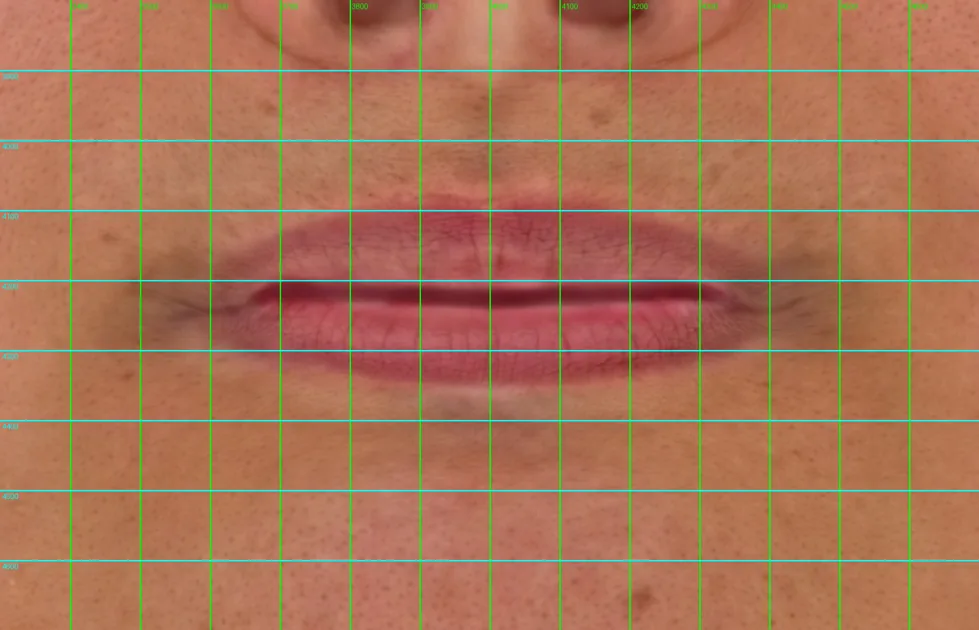
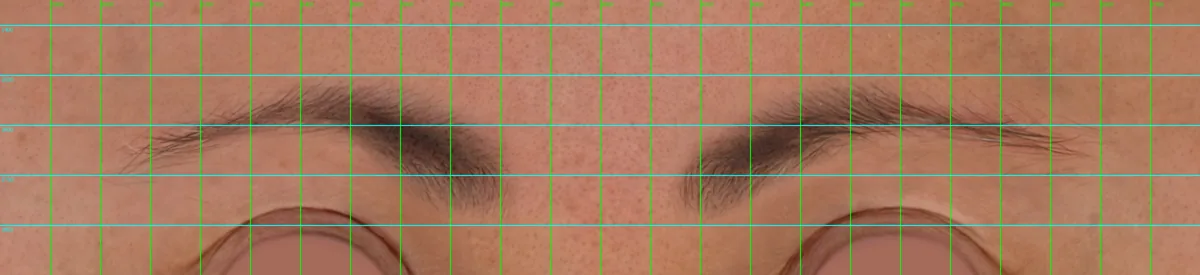
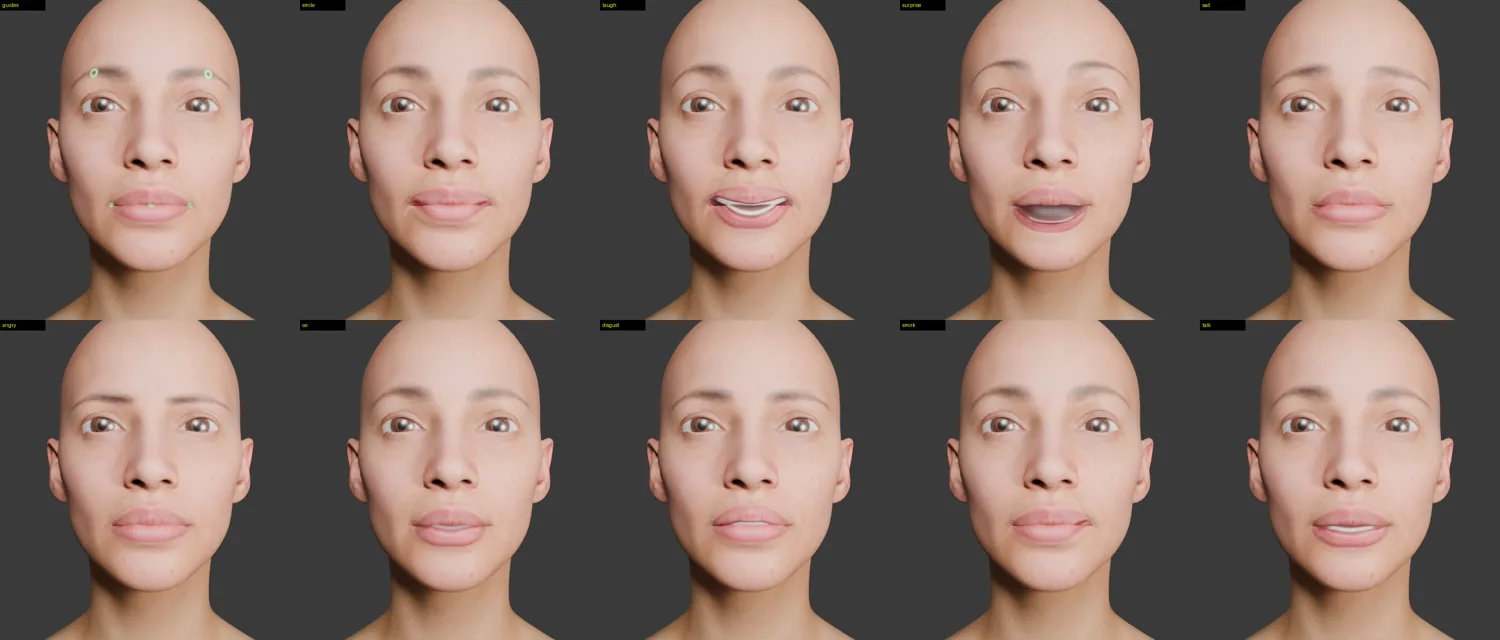
The mouth is part of the print, so expressions are made by warping the texture in UV space. The first step was to find the face on the 8K texture: the lip line, the mouth corners and the brows were measured on a grid (Figs. 5, 6), so the add-on knows exactly where each feature is.
Warping the texture
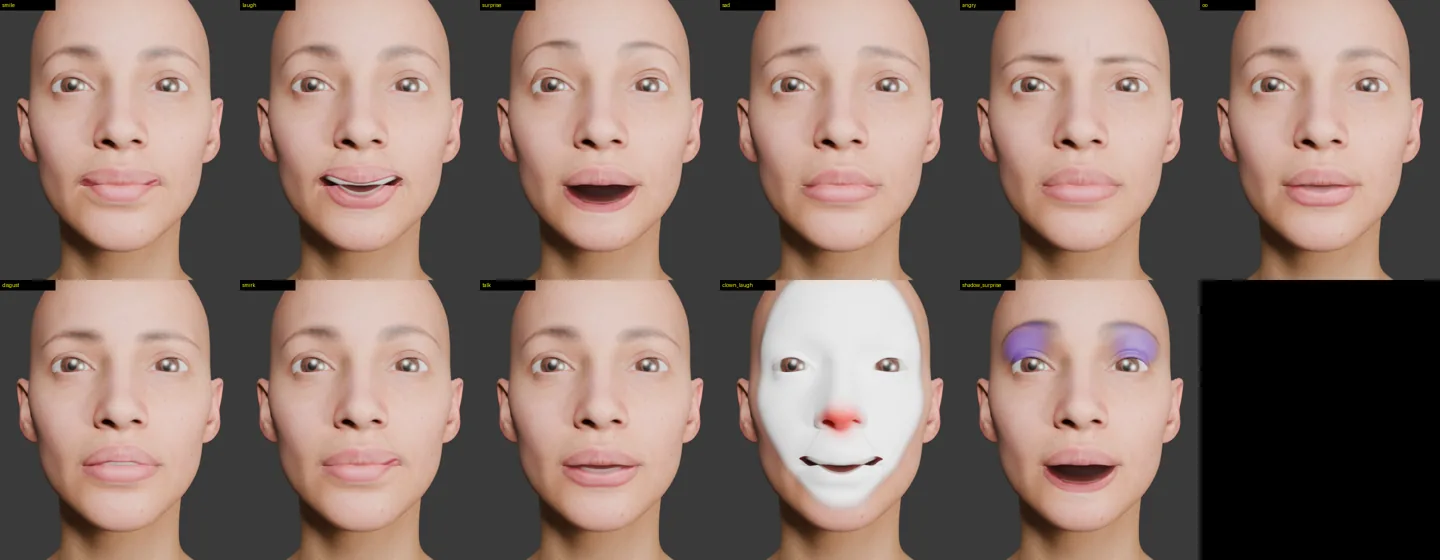
A shader cannot push pixels around; it can only choose where to read the texture from. So each expression works by shifting where the face is read: for a smile, the mouth corners read from a little lower and further in, which makes them appear to lift and widen, and the cheeks rise with them. Soft falloffs centred on the mouth corners, cheeks and brows keep the movement smooth, and a single Intensity control keeps every expression within what looks natural on a given head.
Opening a closed mouth
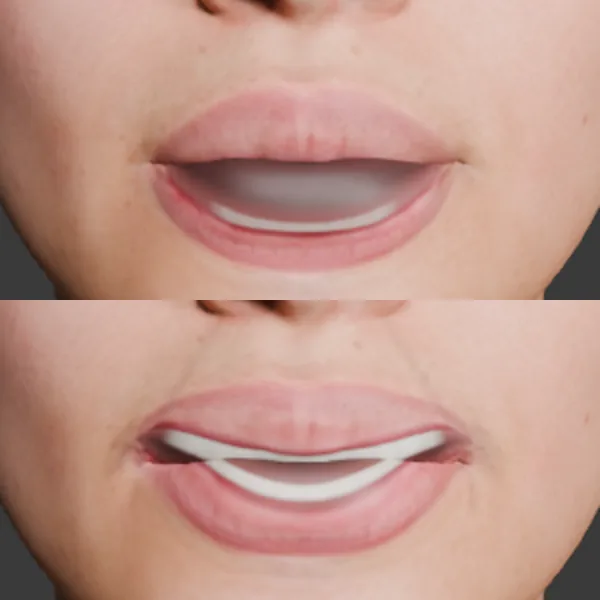
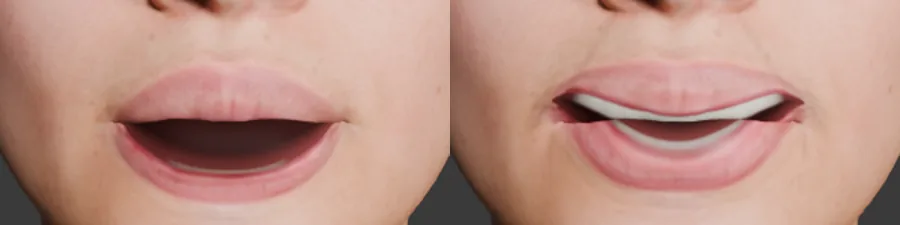
A smooth warp cannot open a mouth, because the lips have to separate. So the texture is split along the lip line: the upper lip lifts, the lower lip and chin drop, and the gap between them is filled with a rendered mouth interior and teeth. The corners stay joined, and skin shine is switched off inside the gap, because in the first pass it made the open mouth look grey (Fig. 9).

Scanned shapes: a second method
The warp has a ceiling. It approximates muscles rather than measuring them, and every new expression is another set of numbers to tune by eye. Version 1.1 of the add-on adds a second method, chosen with a switch at the top of the Face panel: Scanned Shapes. It is built on 3D Scan Store's free Multi Expression Base Mesh.
What the Multi Expression Base Mesh is
3D Scan Store, run by Ten24 Media, sells photogrammetry scans of real people. Every one of its retopologised and HD head scans is rebuilt onto the same fully quadded, symmetrical topology, so textures, displacement maps and sculpts move freely between heads. The store also gives away base meshes on that topology: a male and a female head, each blended from 50 face scans, and a super average head that combines the two, an average of over 100 people.
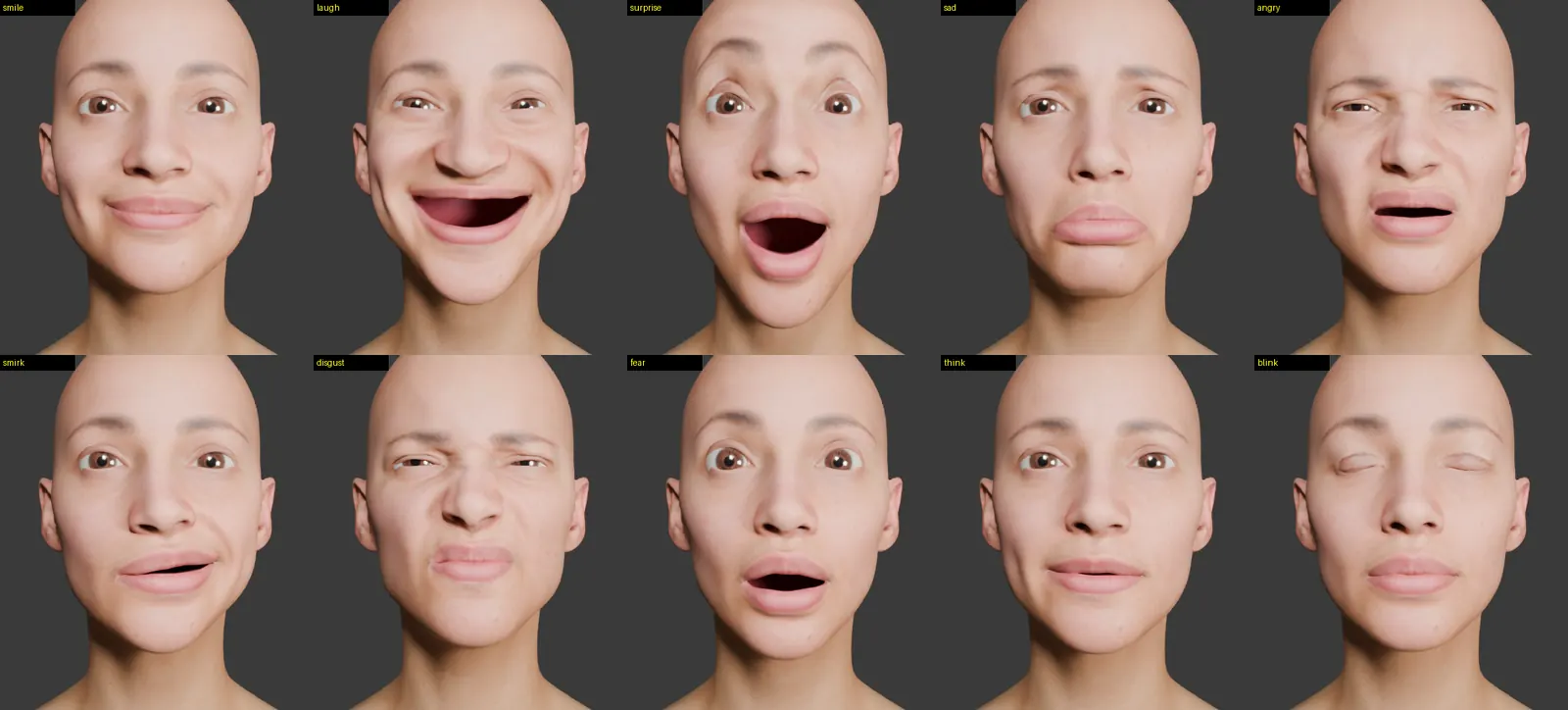
The Multi Expression Base Mesh, released free by the studio's James Busby, adds expressions to that super average head. Real faces were captured pulling each expression on the company's photogrammetry rig, and each capture was transferred onto the super average mesh. The result is one set of vertices posed many times: every expression has exactly the same vertex count and order as the neutral, which is what makes it usable as a blend shape. The download contains the mesh as ZBrush files at centimetre and metre scale, the expression sets as OBJ files exported at subdivision levels 1, 2 and 3, and a wrapping guide. The level-1 set used here holds 28 expressions besides the neutral, listed below.
It was made for character artists. The intended workflows either sculpt a new character on the base mesh, or wrap the base mesh onto an existing sculpt in Wrap 3, project the detail back in ZBrush and then dial expressions in with sliders. Because it shares the store's UV layout, its 16K textures and HD displacement maps apply directly. It is free in exchange for joining the mailing list, under the Personal Single User licence: private and non-commercial use only, with commercial use by arrangement with the studio.
| Group | Scanned shapes |
|---|---|
| Eyes and brows | Eyes Closed, Eyes Closed Tight, Eyes Wide, Brows Down |
| Mouth and jaw | Smile Closed, Smile Open, Mouth Open Wide, Mouth Open Left, Mouth Open Right, Long Face |
| Cheeks and nose | Cheek Pull Left, Cheek Pull Right, Cheek Suck, Cheek Puff, Face Compress, Snarl |
| Speech shapes | CH, FV, MM, OO, EE, LL, WW |
| Whole emotions | Happy, Sad, Surprise, Anger/Pain, Fear |
Using it to animate light
This project uses the base mesh in a way it was not designed for: not to sculpt a character, but to animate light. The digital head deforms instead of its texture. That still works on a print that cannot move, because the projector shows the render from its own point of view: if the twin smiles, the render draws lips and cheeks where a smiling face would put them, and that image lands on the static surface. The printed head is itself a 3D Scan Store head on the shared topology, so the two match exactly, 12,466 vertices and 12,410 faces in the same order. That removes the usual wrapping and fitting step. The add-on finds the OBJ set whose neutral scan matches the head's vertex count, aligns that neutral to the head, and stores every expression as a shape key on the head itself. All 28 load in under a second.
Only the movement of each scan is carried across, not its face, so the head keeps its own features and gains the scan's motion. The add-on checks the fit first and refuses a set that does not line up with the head. Each expression is driven by its own slider and by the same Intensity control as the warp, and an optional blink link lets the scanned eyelids close with every blink.
Same controls, real muscles
Every scan gets its own slider on the FaceRig, so it can be keyframed or driven from Bottango like the neck. The preset buttons keep their names and switch source with the method: Smile becomes the Smile Closed scan, Laugh is Happy with a little Smile Open, Angry is Anger/Pain with Brows Down, Smirk is Cheek Pull Left and Disgust is Snarl. The loop generator's talking now cycles through the scanned speech shapes (CH, FV, MM, OO, EE, LL and WW) with a little jaw opening, instead of plain jaw flaps, and its loops still start and end on the same pose. Overlays need no linking at all, because they are painted on the surface that is deforming.
Where geometry breaks the illusion
The print still cannot move, and that splits the scanned motion in two. Movement across the face, such as mouth corners, brows and cheeks sliding over the skull, projects correctly from anywhere. Movement out of the face, such as a puffed cheek or pouted lips, is drawn on the real surface but meant to sit in front of it, so it only lines up from the projector's position.
The further a shape moves out of the surface, and the further a guest stands from the projector's line, the more out of place it looks: a 4 mm cheek puff seen 30° off axis appears a couple of millimetres off. Mouth Open Wide and Long Face have a second problem: they drop the chin below the real chin, so that part of the image lands on the neck or misses the head entirely.
| Criterion | Texture warp | Scanned shapes |
|---|---|---|
| What moves | Where the texture is sampled, in UV space | The head's vertices, in 3D |
| Source of the motion | Hand-tuned warps | 28 expressions scanned from a real face |
| Opening the mouth | Split lip line with a rendered interior and teeth | Stretches closed lips; big jaw opens overshoot the chin |
| Off-axis guests | Correct from any angle | Out-of-surface motion shifts when seen off axis |
| Overlays and makeup | Sampled through the same warp | Follow automatically |
| Best for | Jaw, mouth interior, painted lids | Smiles, brows, cheeks, sneers and squints |
The two methods are therefore complementary rather than rivals. Scanned shapes carry the expressions that slide across the face; the texture system keeps the mouth gap, interior, teeth and the Eye Rig's painted lids; big jaw opens stay subtle or short until they have been checked on the real projection. Because both answer to the same sliders, presets and loop generator, the animation, the Bottango link and the loops are unchanged, and the head can be switched between methods to compare them on the physical print. The whole mode was tested in Blender 5.0 with the Eye Rig: loading, every preset, the blink link, a seamless talking loop and clean removal. The personal, non-commercial licence covers this proof of concept; any paid or client version would need the studio's agreement.
One head, many faces
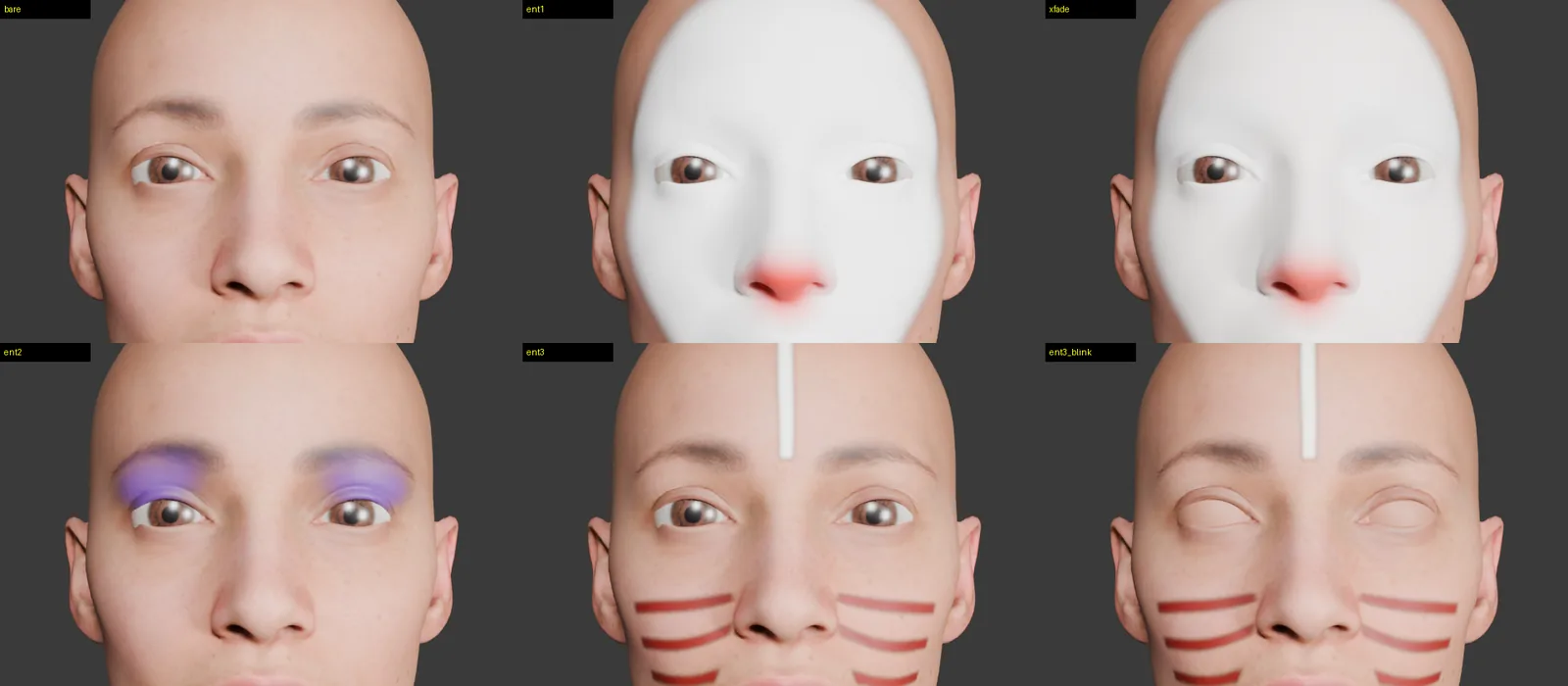
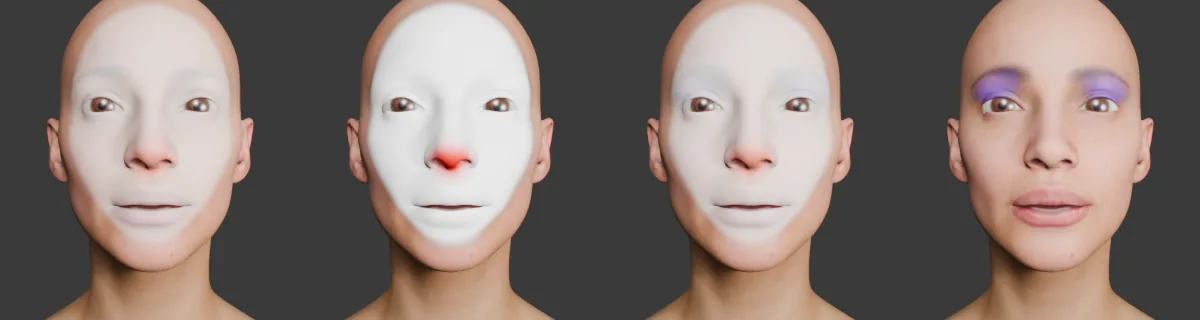
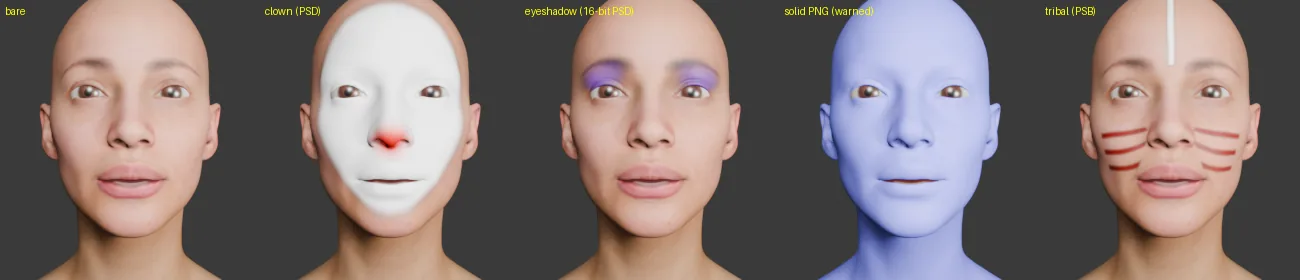
3D Scan Store publishes free overlay textures that share its heads' UV layout: makeup, tribal paint, clown faces, mud and grime. The add-on loads a folder of them into a playlist and crossfades between faces on a looping timeline, so the demo cycles through characters without reprinting anything.
Each face is layered over the base skin using its own transparency, so paint sits on the skin rather than replacing it, and changes between faces ease in and out instead of cutting. The shader only ever holds two faces, the outgoing one and the incoming one, and swaps in the next as the playlist moves on, so memory use stays the same however many faces are loaded.
The PSD problem
The overlays ship as layered PSD files containing albedo, roughness, gloss, specular, normal and height maps. Blender reads only a PSD's merged image, which has no transparency. The first build therefore showed each face correctly while it faded in, then turned the whole head one solid colour as the opaque image reached full strength (Fig. 15). The fix was a PSD and PSB reader written for the add-on in Python and NumPy. It parses the layer records, follows layer groups, applies layer masks, decodes raw, RLE and ZIP-with-prediction channels at 8, 16 or 32 bits, and extracts only the albedo layer. Downsampling uses alpha-weighted averaging so transparent edges do not bleed dark halos.
The reader was checked against an independent PSD library on several kinds of test file and matched it exactly. A 4K file decodes in about a second.
Eyelids that match the makeup
When a face changes, the painted blink lids on the eyes must change too, or eye shadow vanishes every time the character blinks. The add-on samples each face's upper-eyelid region in UV space, alpha-weighted and composited over the base skin, and drives the Eye Rig's lid colour through every crossfade.
What makes a face feel alive
Guests do not inspect a character's face; they read it, in a fraction of a second and mostly through the eyes. Realism in a texture matters far less than whether the face behaves the way faces behave. The animation in this project is built on a small number of observations about human faces, each turned into a rule the generators follow.
| Observation | Rule in the system | Why a guest notices |
|---|---|---|
| Eyes move in fast jumps (saccades) between still fixations, not in smooth pans. | Gaze changes in 0.12 s and then holds; holds are random with a mean set by the designer. | Smoothly drifting eyes read as mechanical or drugged. |
| People blink around 15 times a minute at rest, fewer when concentrating [4]. | Blinks every 3.5 s on average with variation; occasional double blinks; fast close, brief hold, slower open. | Regular, metronomic blinking is one of the quickest tells of a machine. |
| The upper lid follows vertical gaze. | Lid follow control couples lid height to look up and down. | Eyes looking down under a fixed lid look startled. |
| Two eyes converge on what they look at. | Vergence from fixation distance; per-eye trims for calibration. | Parallel or over-converged eyes look unfocused or cross-eyed. |
| A felt smile also narrows the eyes, the Duchenne marker [5]. | Smile and laugh presets raise the Eye Rig's lower lid. | A mouth-only smile reads as polite or false. |
| Faces are asymmetric and never quite still. | Independent left and right corners and brows; small random drift during holds; smirk and thinking presets. | Perfect symmetry and stillness push a face towards the uncanny [6]. |
| Speech has a syllable rhythm of a few per second. | Talking passages flap the jaw on 0.12 to 0.24 s syllables with varied mouth width and occasional pauses. | Constant-rate flapping reads as a puppet. |
| Eyes reflect the light around them. | A catch-light in the iris; real reflections in lit mode. | Matte eyes look dead. |
Interaction: from playback to presence
The current demo is a loop. The architecture was built so that it does not have to stay one. Because every behaviour is a property on a rig object, any input that can set a number can perform the face. The next stage is to give the head something to respond to.
Mutual gaze
A camera near the figure tracks guests' faces, and the nearest or most recently arrived guest becomes the eyes' target. Being looked at is the strongest social cue a character can give, and it costs nothing mechanically because the eyes are light.
Proximity and attention
Expressions respond to how close a guest is and how long they stay: a greeting on approach, attention while they remain, a glance away as they leave. In a queue, the figure can divide its attention across a group rather than staring at one person.
Contingency over fidelity
A face that responds at the right moment can be more convincing than a more detailed face that ignores you. Timing variability, reaction latency and pauses are therefore treated as design parameters, not noise.
Inclusive by default
My time supporting customers with accessibility needs at Apple shaped the requirements. Performances should not depend on audio alone, captions must be possible, and lighting changes should avoid rapid flashing. Faces carry grammar in sign languages such as BSL, which raises a research question: could a projected face give a signing character the facial expression that a mechanical one cannot?
Operations and safety
- Calibration as a daily routine. Today the projector is aligned by hand with projected landmarks. A guest-facing version needs a repeatable routine, ideally automated with a camera and fiducial markers, so alignment can be re-checked at opening instead of relying on a one-time setup that drifts.
- Content without hardware. New faces, makeups and performances ship as files. The physical figure stays the same.
- Projector eye safety. The lens should sit above and away from guest sightlines so nobody can look straight into the beam at close range.
- Graceful failure. If projection fails, the print is still a sculpted head rather than a broken mechanism. The live show-control version should be able to detect a lost video feed and dim or park the neck.
A neck that holds still
With the face software working, the dominant error in the system is now mechanical. The neck uses hobby servos. They are cheap and easy to drive, but their gear trains have backlash: free play that lets the output move without the motor turning. When the head reverses direction, or when its weight shifts across an axis, it rocks through that play and keeps wobbling for a moment after it stops. The twin in Blender does not know this has happened, so the projected face slides across the print.
How the neck has already evolved
The wobble was visible from the first physical tests, and the neck has already been through one round of fixes.
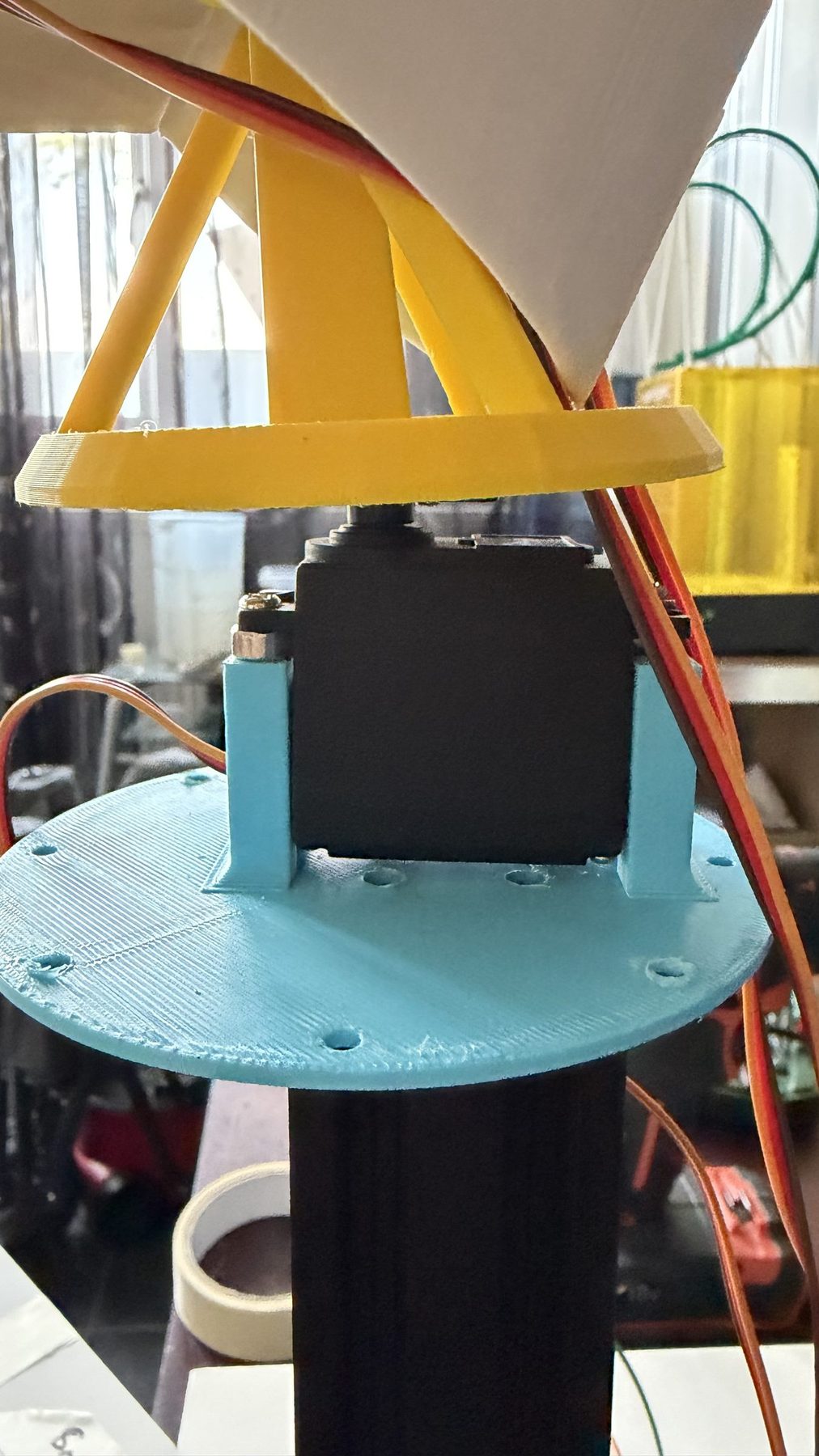
Revision 1a: head on the servo. The head was connected directly to a servo, so the servo's output shaft carried the whole weight of the head as well as turning it. Any side load went straight into the servo's small internal bearing and gear train, and the head rocked on the shaft with visible play.
Revision 1b: adding a thrust bearing. A thrust bearing was added so the bearing carries the head's weight and the servo only has to supply rotation. Rotation on that axis became noticeably steadier.
What remained. The servo driving the other axis still had backlash in its gears, so the head still rocked whenever that axis reversed or the head's weight shifted, and the projected face still slipped. Supporting one axis better fixed a symptom, not the cause. The neck needs a new motion system in which every axis is both supported and driven without play.
assets/neck-1a-direct.jpg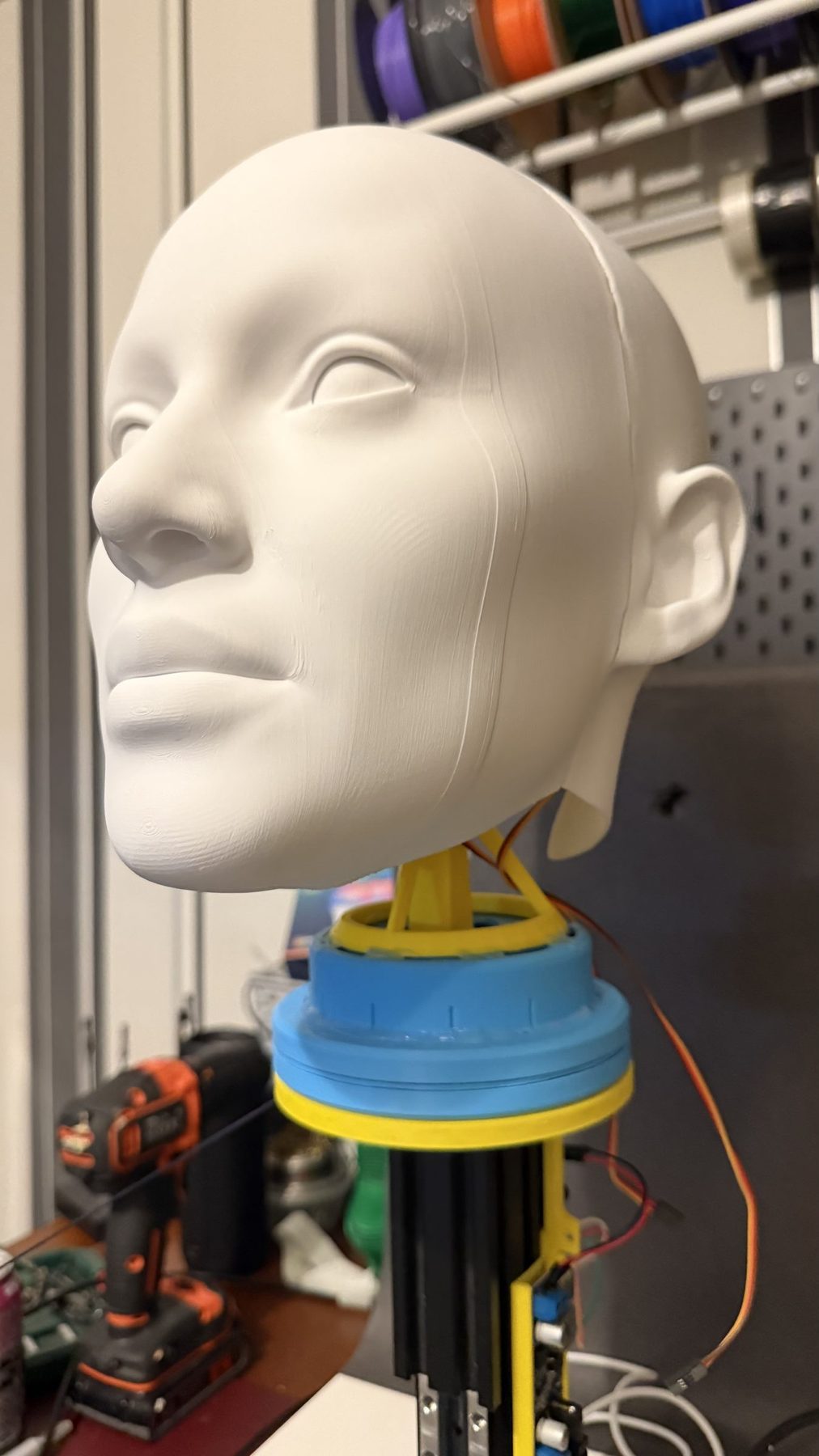
assets/neck-1b-thrust-bearing.jpg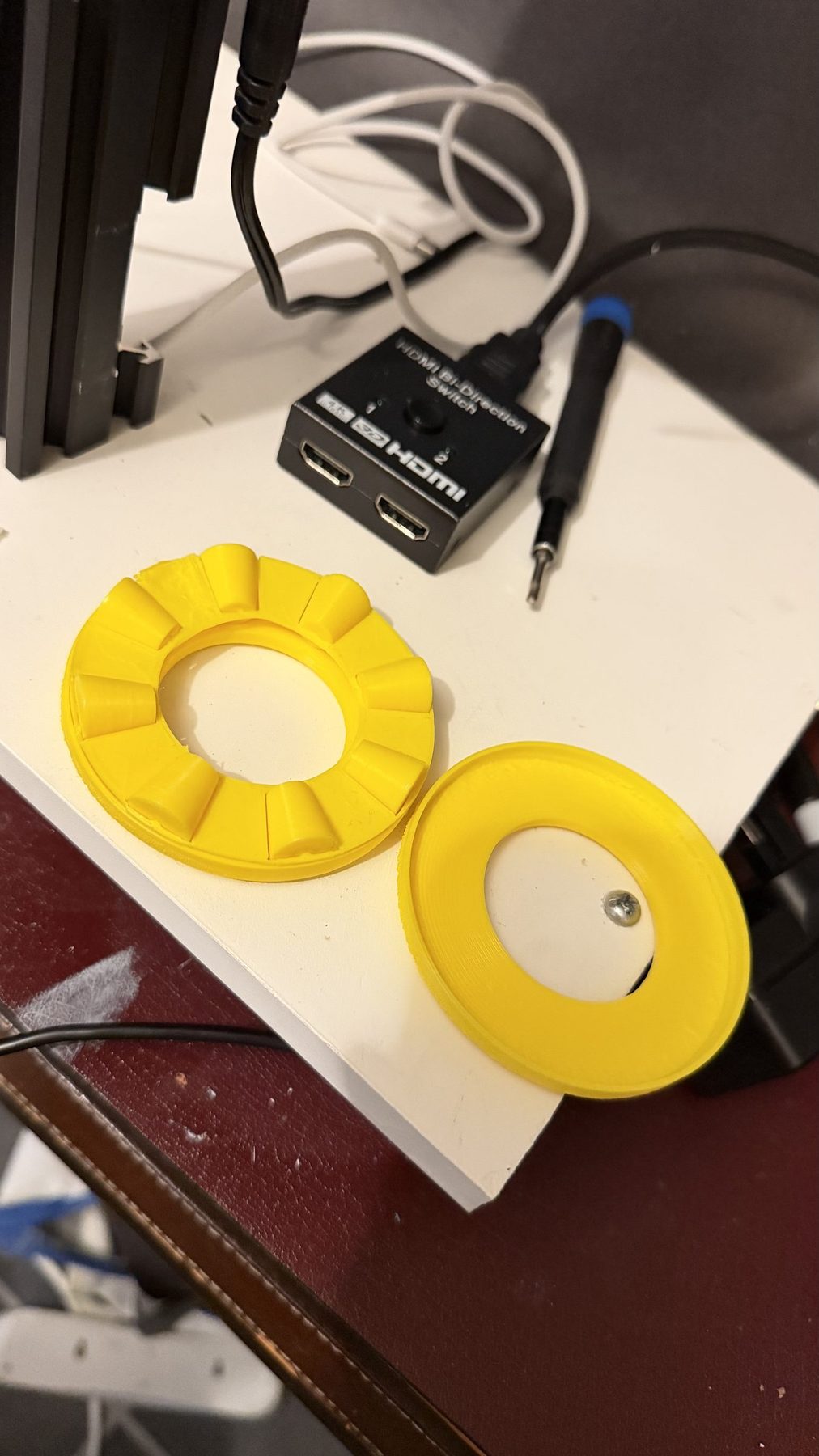
assets/neck-bearing-detail.jpgassets/neck-backlash.mp4Error budget
A rotation error Δθ about an axis moves a point at radius r by an arc of r · Δθ. Dividing by the pixel footprint gives the misregistration in projector pixels.
Worked for one degree of play on the tilt axis, with the eyes about 0.15 m above the pivot and a 0.5 m wide image on a 1280-pixel panel. The figures are illustrative; the next step is to measure the real neck, for example with a camera tracking fiducial markers on the head.
Proposal: closed-loop steppers
Revision 2 replaces each servo with a NEMA 17 stepper motor fitted with an integrated encoder and closed-loop driver, coupled to the axis through a low-backlash reduction. The current candidate is the MKS SERVO42C, a low-cost closed-loop driver that mounts on the back of a NEMA 17 and reads a magnetic encoder on the motor shaft, and accepts the same step and direction signals as an ordinary stepper driver. Two transmissions are under consideration: a tensioned GT2 timing belt, which is simple, quiet and printable, and a capstan cable drive, which has effectively zero backlash and is well established in haptics and robotics.
1.8° full steps, 1/16 microstepping and a 5:1 reduction; a 14-bit magnetic encoder on the motor shaft. Commanded resolution falls to a fraction of a projector pixel, so the remaining error comes from structural stiffness, which is a design problem that can be solved.
Closing the loop on the image as well
Encoders change more than the motor control. Today the twin follows the commanded pose and assumes the head obeyed. With encoders, the controller can report the measured angle of every axis, and Blender can render from where the head actually is. Any error that does remain is corrected in the image instead of being shown to the guest.
Driving revision 2 from the same animation
Bottango drives stepper motors through step and direction signals and can home them at start-up, so revision 2 keeps the existing workflow: each axis is redefined as a stepper, homed, and the neck performance already on the timeline plays on the new hardware. Bottango stays on the command side. Today Blender polls Bottango and receives commanded positions only. Revision 2 adds a second source: the SERVO42C has a serial interface for reading its encoder, so the add-on could poll each driver for its measured angle the same way it polls Bottango, and render from where the head actually is. A second encoder on the output, after the belt, would go further and also catch any stretch in the transmission.
| Criterion | Revision 1: MG996R hobby servos | Revision 2: closed-loop steppers |
|---|---|---|
| Position feedback | Internal potentiometer, not readable by the show system | Encoder per axis, reported back to Blender |
| Backlash | Gear-train play, visible as wobble on reversals | Tensioned belt or capstan, near zero |
| Resolution at the output | Limited by pulse deadband and gear play | 0.0225° step, 0.0044° encoder |
| Holding under load | Hunts around the setpoint; can buzz | Constant holding torque; corrects missed steps |
| Motion profile | Servo's own speed curve | S-curve acceleration, tuned to avoid exciting the structure |
| Driven from Bottango | Servo pulses from the ESP32 through a PCA9685 | Step and direction, homed at start-up |
| Homing | Absolute by design | Hall sensor or end-stop per axis at power-up |
| Maintenance | Gear wear increases play over time | No brushes or gear teeth to wear; belt tension and bearings are the service items |
| Cost and complexity | Lowest | Higher: drivers, power supply, homing |
Mechanical design goals for revision 2
- Intersecting axes. Pan, tilt and roll axes meet at one point inside the head, so a rotation never adds a translation the twin would also need to model.
- Counterbalance. Balance the head about the tilt axis so the motors hold position rather than fighting gravity, which also removes the preload that hides backlash until a reversal.
- Stiffness before speed. A stiff frame with a high natural frequency, and motion profiles that stay below it.
- Measure, then trust. Add a camera and fiducial markers to record actual head pose against commanded pose for both revisions, so the improvement is a measured number rather than a claim.
- Designed for the people who maintain it. Driver boards and belts reachable from the back of the figure, keyed connectors, and a documented homing and calibration routine for the start of each day.
Designing for a show space
A figure that moves near guests is judged first on what it does when something goes wrong. ISO 17842-1, the international standard for amusement rides and devices, sets requirements for electrical equipment and control systems and defines a passenger safety envelope that nothing may intrude into [21]. The UK's HSG175 guidance counts changes to controls and software as safety-critical modifications that need inspecting again [20]. Revision 2 carries those questions into the brief:
- Know the safe state. Today, if the ESP32 crashes or stops sending updates, the PCA9685 keeps outputting the last pulse it was given, so the head holds wherever it was. Revision 2 should define where the head goes on power loss, controller failure and start-up.
- A stop that doesn't rely on software. A hardwired stop that cuts motor power, separate from the show controller.
- Detect what open loop can't. The closed-loop drivers report a stalled or blocked axis instead of pushing on blindly.
- Limit the reach. Mechanical end stops so no axis can travel beyond its animated range, whatever the controller commands.
My notes on how rides are designed, reviewed and inspected are in How ride safety works.
Making the invisible visible
The project began as a texture on a print and became a lesson in where illusions actually break. None of the hard problems were where I expected. The maths of projection was straightforward; the failures came from assumptions about axes, about file formats, about which texture a material really uses, and finally about a few degrees of gear play. Each one was invisible until the system was built end to end and looked at the way a guest would.
That is the work I want to do in themed entertainment: connecting story, mechanism, software and operations, and carrying an idea through to a figure that is reliable, maintainable and convincing every day, not only on opening night.
Roadmap
- Measure the residual error of the landmark calibration on the print, then trial automatic calibration with a camera and fiducial markers.
- Build revision 2 of the neck and publish servo-versus-stepper measurements.
- Camera tracking with hidden markers (infrared or UV), and render-ahead prediction from the known animation curve to cancel latency.
- A jaw actuator, the one facial mechanism that both Disney and the static-lip results suggest is worth keeping.
- Camera-based guest tracking driving the eyes' target.
- Audio-driven lip sync, mapping speech to jaw and mouth shapes.
- Two-projector coverage for the sides of the head, with edge blending.
Sources
- A. Bermano, P. Brüschweiler, A. Grundhöfer, D. Iwai, B. Bickel and M. Gross, "Augmenting Physical Avatars Using Projector-Based Illumination," ACM Transactions on Graphics (SIGGRAPH Asia), 2013. Disney Research
- "Disney takes a new approach with Audio Animatronics on its Seven Dwarfs Mine Train," Theme Park Insider, April 2014. themeparkinsider.com
- "Frozen Ever After," Wikipedia, accessed October 2026. en.wikipedia.org
- "The timing of spontaneous eye blinks in text reading suggests cognitive role," Scientific Reports, 2025. nature.com
- P. Ekman, R. J. Davidson and W. V. Friesen, "The Duchenne smile: Emotional expression and brain physiology II," Journal of Personality and Social Psychology, 58(2), 1990.
- M. Mori, "The Uncanny Valley," Energy, 7(4), 1970; English translation by K. F. MacDorman and N. Kageki, IEEE Robotics & Automation Magazine, 2012.
- J. Busby, "Free: Multi Expression Basemesh," 3D Scan Store (Ten24 Media). 3dscanstore.com
- "Free to download male, female and super average base meshes," 3D Scan Store (Ten24 Media). 3dscanstore.com
- 3D Scan Store, "Overlay Maps." 3dscanstore.com
- A. H. Bermano, M. Billeter, D. Iwai and A. Grundhöfer, "Makeup Lamps: Live Augmentation of Human Faces via Projection," Computer Graphics Forum (Eurographics), 2017. Disney Research (PDF)
- "Disney Debuts First Projection-Mapped Face On An Audio-Animatronic," BlogMickey, June 2026. blogmickey.com
- "I watched Disney's next-gen audio-animatronic transform from a pirate to a skeleton," TechRadar, 2026. techradar.com
- "Disney Debuts Its First Projection-Mapped Animatronic Face," DVC Shop, 2026. dvcshop.com
- "Disney Files NEW Patent That Could Be a Game-Changer for Theme Parks" (US application 18/592,863), AllEars.Net, September 2025. allears.net
- P&P Projects, "Dynamic Projection Mapping," July 2026. ppprojects.com
- "Reactive Projection Mapping on Moving 3D Objects" (7thSense), Blooloop Innovation Awards, 2022. blooloop.com
- "Scalable and 7thSense Unveil Multi-Object Reactive Projection Mapping at ISE 2025," rAVe, 2025. ravepubs.com
- "P&P Projects launches ThemedMotion, specialising in animatronics & animated figures," Blooloop, September 2024. blooloop.com
- "7thSense launches sister company, CurtainUp," Blooloop, September 2025. blooloop.com
- Health and Safety Executive, HSG175 Fairgrounds and amusement parks: guidance on safe practice, 3rd edition, 2017. hse.gov.uk
- ISO 17842-1:2023, Safety of amusement rides and amusement devices, Part 1: Design and manufacture, Annex A (electrical equipment and control systems) and Annex H (safety envelope for passengers). iso.org